Building Sensei
A personal AI learning assistant that delivers customized lessons to Discord every day using Claude.
The Problem
Learning from docs and courses feels disconnected from real work. No one adapts explanations to your specific background. And consistency is hard without external triggers — motivation fades, but habits stick.
I wanted something that knew my background, referenced projects I’d actually built, and showed up daily whether I felt like studying or not.
What Sensei Does
Sensei is a serverless app that acts as a personal AI tutor. You define a curriculum — an ordered sequence of topics — and Sensei works through it on a schedule, sending personalized lessons to Discord.
The core loop:
Cron Trigger → Find Due Tasks → Execute Handler → Call Claude → Evaluate → Deliver to Discord
Every 15 minutes, a cron job checks for tasks that are due. Each task maps to a handler that builds a prompt, calls Claude, runs the response through quality evaluation, and delivers the result as a rich Discord embed.
Choosing the Stack
| Layer | Technology | Why |
|---|---|---|
| Runtime | Cloudflare Workers | Serverless, edge-deployed, built-in cron, generous free tier |
| Framework | Hono | Lightweight, TypeScript-native |
| Database | Cloudflare D1 | SQLite at the edge, zero config |
| AI | Claude API (Anthropic) | Strong reasoning, follows complex prompts, good at teaching |
| Quality | sensei-eval (npm) | Deterministic + LLM-judge scoring for generated content |
| Delivery | Discord Webhooks | Rich embeds, mobile notifications, already open all day |
| Frontend | React + Vite | Admin UI on Cloudflare Pages |
The whole thing runs on Cloudflare’s free tier. No servers to manage, no cold starts with D1, and the cron trigger is built in.
Data Model
Four core concepts drive the system:
- Tasks define what to do and when — a task type, an hour/minute schedule, and which days of the week to run
- Sequences define content — an ordered list of topics with descriptions that give Claude context for each lesson
- Progress tracks where you are in each sequence and prevents duplicate sends with a deduplication window
- Message log records everything sent — the prompt used, Claude’s response, and delivery status
Eval results are stored alongside messages so I can review quality scores in the UI later.
Task Types
Each task type maps to a handler function via a simple registry pattern. Adding a new type means writing one function — no changes to the core scheduler.
| Type | Purpose |
|---|---|
curriculum | Sequential lessons — works through a topic sequence in order |
challenge | Coding puzzles with progressive hints |
accountability | Evening check-ins prompting reflection |
mixed | Rotating formats — lessons, tips, questions |
job_insight | Breaks down skills from target job postings |
Personalization
Every Claude call combines two pieces of context:
A personality prompt that defines how to teach — be direct, opinionated, use real analogies, challenge the student.
A user profile that defines who you’re teaching — your experience level, tech stack, projects you’ve built, how you learn best, and your goals.
This is what makes it feel different from a textbook. Claude references your actual projects in examples, calibrates explanations to your level, and connects new concepts to things you’ve already built. It feels like talking to a colleague who knows your work.
Prompt Caching
The personality and user profile are large blocks of text that stay the same across every API call. Without caching, those tokens get billed as new input on every single lesson — and with multiple tasks running daily, that adds up.
Anthropic’s API supports prompt caching, which lets you mark stable prefix content with a cache_control breakpoint. The first call processes and caches those tokens. Subsequent calls within the cache TTL (currently 5 minutes) read from cache at a 90% discount on input token cost. Since Sensei’s cron fires multiple tasks in the same window, the personality and profile are cached on the first call and reused by every task that follows.
In practice this means the system prompt and user profile — the largest and most static parts of every request — are only fully processed once per cron cycle. The per-task cost drops to just the unique parts: the topic description, previous lesson summary, and task-specific instructions.
Scheduling
The Worker cron runs every 15 minutes. The scheduler queries for tasks due within the current window, checks a deduplication timestamp to prevent double-sends, and dispatches matching tasks to their handlers.
The 15-minute granularity is the smallest reliable interval on Workers’ free tier. A 30-minute dedup window accounts for any timing drift.
Discord Delivery
Discord webhooks are the delivery layer. Each message is sent as a rich embed with color-coded task types (blue for curriculum, red for challenges, green for accountability). Long content is automatically chunked to stay within Discord’s 4096-character embed limit.
I chose Discord because it’s already open on my phone and desktop all day. No extra app to check — the lessons just appear in a channel alongside everything else I’m already reading.
Quality Evaluation
Generated content varies in quality between runs. Without measurement, you can’t tell if a prompt change actually improved things or made them worse.
This is where sensei-eval comes in — a separate npm package I built that scores each piece of generated content automatically. It runs two layers of checks:
| Tier | Speed | What It Checks |
|---|---|---|
| Deterministic | Instant | Markdown formatting, content length, code blocks present, heading structure |
| LLM Judge | ~2-3s | Topic accuracy, pedagogical structure, code quality, engagement, repetition |
After Claude generates content and before Discord delivery, the worker runs the evaluation and stores the scores. Each criterion has a weight — high-signal criteria like topic accuracy weight 1.5x while structural checks weight 0.5x.
The admin UI displays per-message scores and per-criterion breakdowns so I can correlate the numbers with my actual reading experience and refine prompts accordingly.
sensei-eval also includes a CLI and GitHub Action for catching prompt quality regressions in CI. When I change a system prompt, I compare against a committed baseline — if any scores drop, the PR fails. More details in the sensei-eval post.
API and Admin UI
The Worker exposes a REST API for managing tasks, sequences, progress, and message history. All routes are protected by secret-based auth.
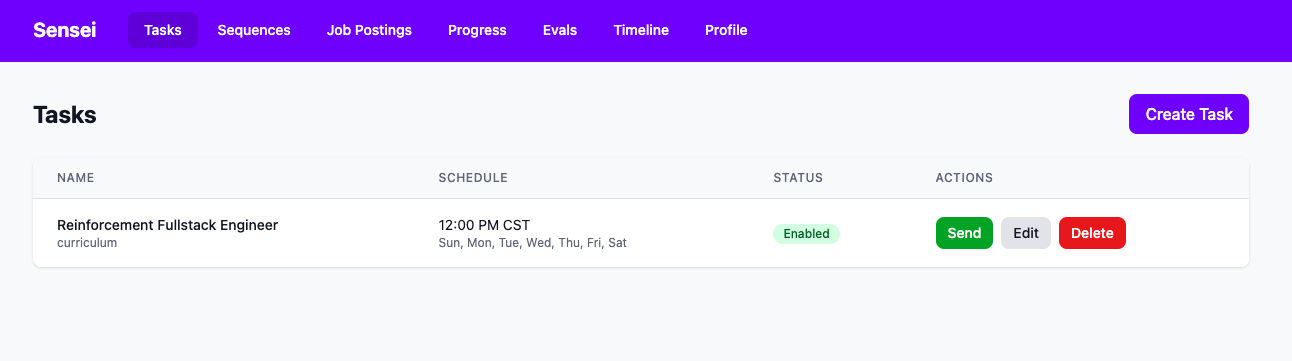
The frontend is a React app on Cloudflare Pages — simple CRUD for tasks and sequences, schedule configuration with time and day-of-week pickers, and an eval results view for reviewing quality scores.
Design Decisions
| Decision | Rationale |
|---|---|
| Discord over email/SMS | Already open, rich formatting, mobile push notifications |
| D1 over external DB | Zero latency, no cold start, Cloudflare-native |
| 15-min cron granularity | Smallest reliable interval on Workers free tier |
| Handler registry pattern | Easy to add new task types, clean separation |
| Hardcoded profile | Single-user system, simplicity over flexibility |
| Prompt caching for profile/personality | 90% input token discount on stable prefix across tasks in same cron window |
| sensei-eval as separate npm package | Reusable across projects, testable in isolation, CI-friendly |
| Committed baseline over re-evaluation | Halves LLM cost, avoids non-determinism in score comparison |
What I Learned
- D1 foreign keys aren’t enforced — handle cascades manually
- Claude wraps JSON in markdown code blocks — always strip them before parsing
- CORS middleware order matters — it has to run before auth
- 15-min cron means tasks can be up to 14 minutes late — good enough for learning content
- Hardcoding the user profile was the right call for v1
What’s Next
- Multi-user support with Cloudflare Access
- Two-way Discord bot for Q&A follow-ups
- Spaced repetition scheduling
- Eval score trends dashboard — correlate quality with prompt changes over time
- Automatic prompt tuning using eval feedback
The Meta Loop
The best way to learn is to build something that makes you learn. Sensei teaches me about ML and systems design while I build Sensei. And building sensei-eval required understanding what makes good educational content — which is itself an exercise in learning about learning.