It’s been a week since I wrote my first post on testing Apple’s on-device AI with Expo. In round one, I used OCR to pull data out of images for a few things I like to track in daily life. It was a good test. I was able to put together a simple iOS app with Expo quickly, run it on my phone, and use OCR to read my weight scale, MyFitnessPal, and my workout spreadsheet.
Today I’m on iOS 27, which lets apps send images straight to the on-device model. The goal is to see whether that’s a viable way to pull data out of images and log it accurately in the app.
First things first: I had some uncommitted changes for a bug with the OCR image labels I hit in round one. So I put up a draft PR to Expo, expo/expo#51375, to get that out of the way and on record. The app already had an image input mode from round one. It just never turned on. So next, I made a fresh build and tested on my phone.
Round Two Was Way Easier
No builds to set up and no Expo project to create. I kicked off a new build, scanned the QR code Expo gave me, and it was running on my phone.
Why round one never had vision
In round one, my EAS config had
"image": "latest". I assumed that meant the newest build image. It pointed at the SDK 57 image instead, which ships Xcode 26.6. The image input code inexpo-aionly compiles with Xcode 27, so that build could never have used vision, even on iOS 27.Dropping the override lets EAS pick the
sdk-58image, which has Xcode 27.0. To make sure, Claude downloaded the finished.ipaand read itsInfo.plist:DTXcode: 2700 DTXcodeBuild: 27A266a DTSDKName: iphoneos27.0Those values get written at compile time, so they show what the build machine actually used, not what the config asked for.
Then the app’s model card said Vision: unsupported. My phone’s model won’t take images, so the app was stuck in OCR mode, same as round one. I reran the tests on iOS 27 anyway.
- The workout screenshot came out as nicely structured data. The model clearly knew it was looking at a workout. But the numbers were wrong. It read the columns top to bottom instead of row by row, so Dips came out as 15/12/6 at 14 lb instead of 15/15/15 at 234 lb, and Chin ups got the next four numbers.
- The scale photo (228.8 lb) just errored out. It called
expo_ocrfour times and hitERR_TOOL_CALL_LIMIT, the cap on how many tool calls one request can make. At least it failed loudly instead of making up 250 like it did in round one.
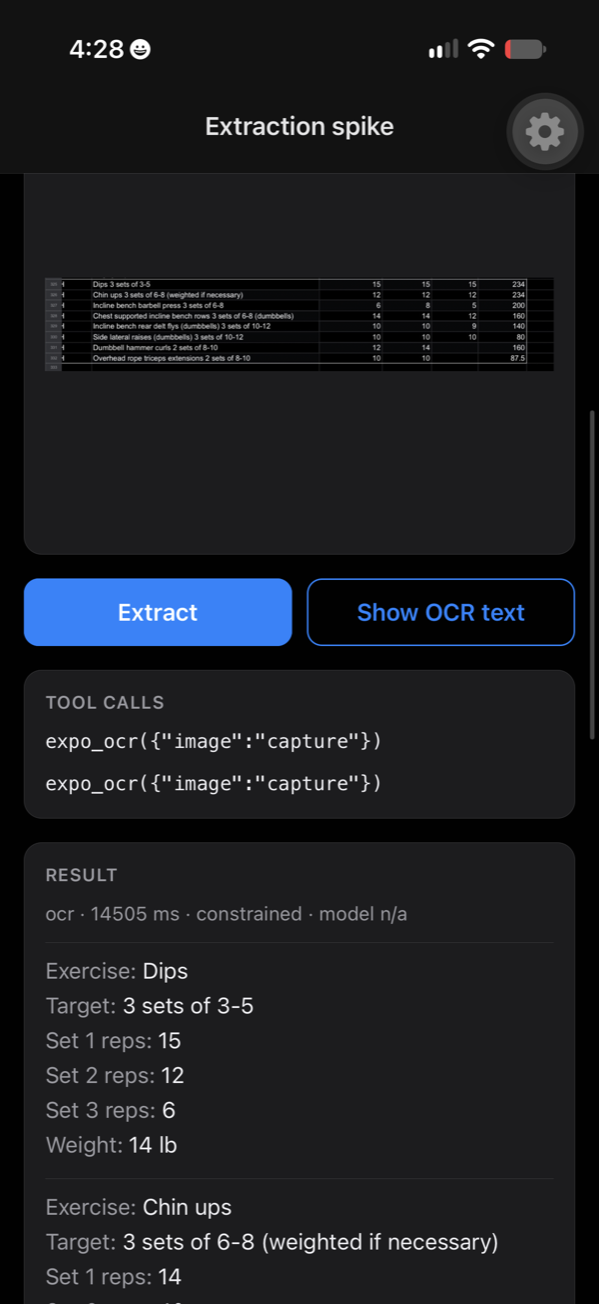
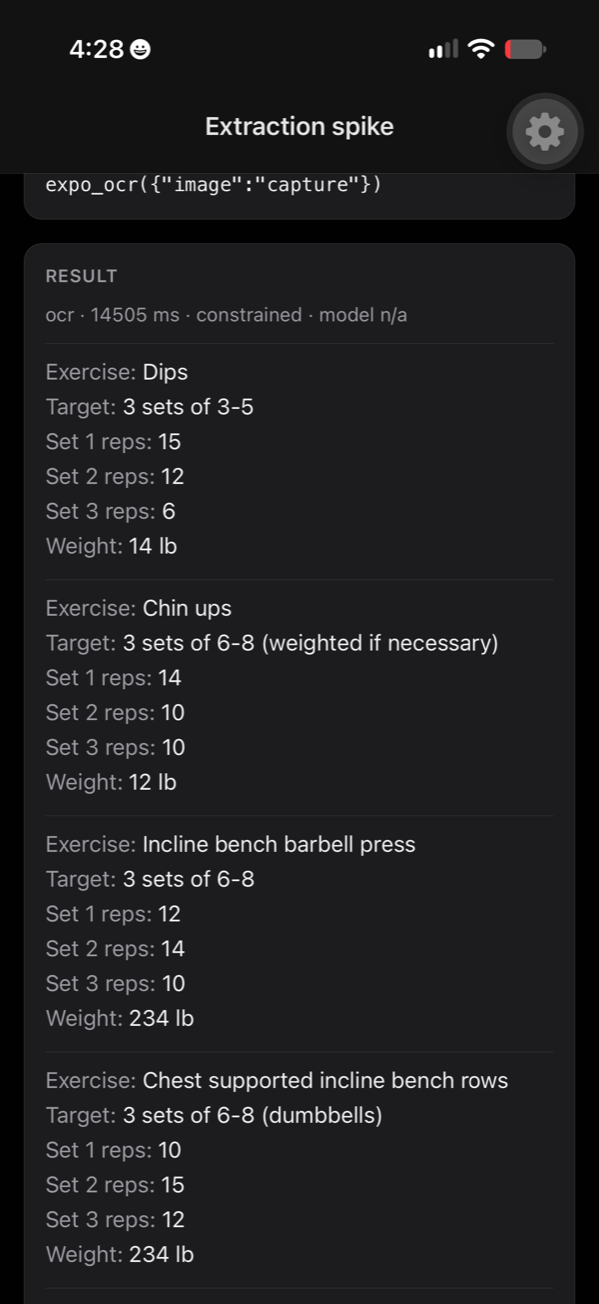
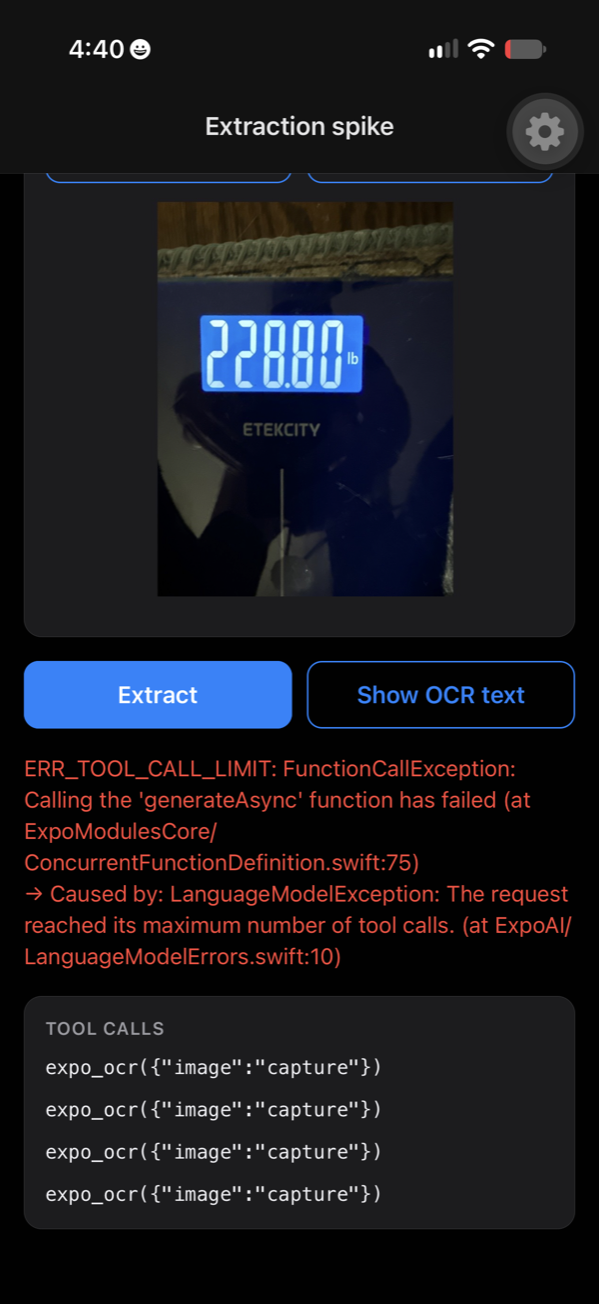
The good news: the image-label bug didn’t come back. Every call used the right label.
My Phone’s Model Can’t See
Digging into this, it turns out my phone’s copy of Apple’s model doesn’t support image input, and iOS reports that back to the app. Apple doesn’t ship the same model to every phone. It picks one that fits the hardware.
The model is called AFM, for Apple Foundation Model. Reading an image needs an extra component, an image encoder, which turns pixels into something the language model can understand. That makes the model bigger and hungrier for memory.
iOS 27 has two tiers: AFM 3 Core and AFM 3 Core Advanced. Advanced is the larger model and only runs on phones with 12 GB of RAM: the iPhone 17 Pro, 17 Pro Max, and iPhone Air, plus the new iPhone 18 Pro, 18 Pro Max, and iPhone Duo. I have an iPhone 16 Pro. What a bummer.
So my phone gets the Core model. That alone doesn’t explain it, though. More on that below.
To decide whether vision is available, expo-ai asks the model this:
SystemLanguageModel.default.capabilities.contains(.vision)I added the device and iOS version to the app’s model card, plus a line saying why vision is off. It came back with “iPhone 16 Pro · iOS 27.0.1” and “Vision unavailable: this device’s system model does not report image input.”
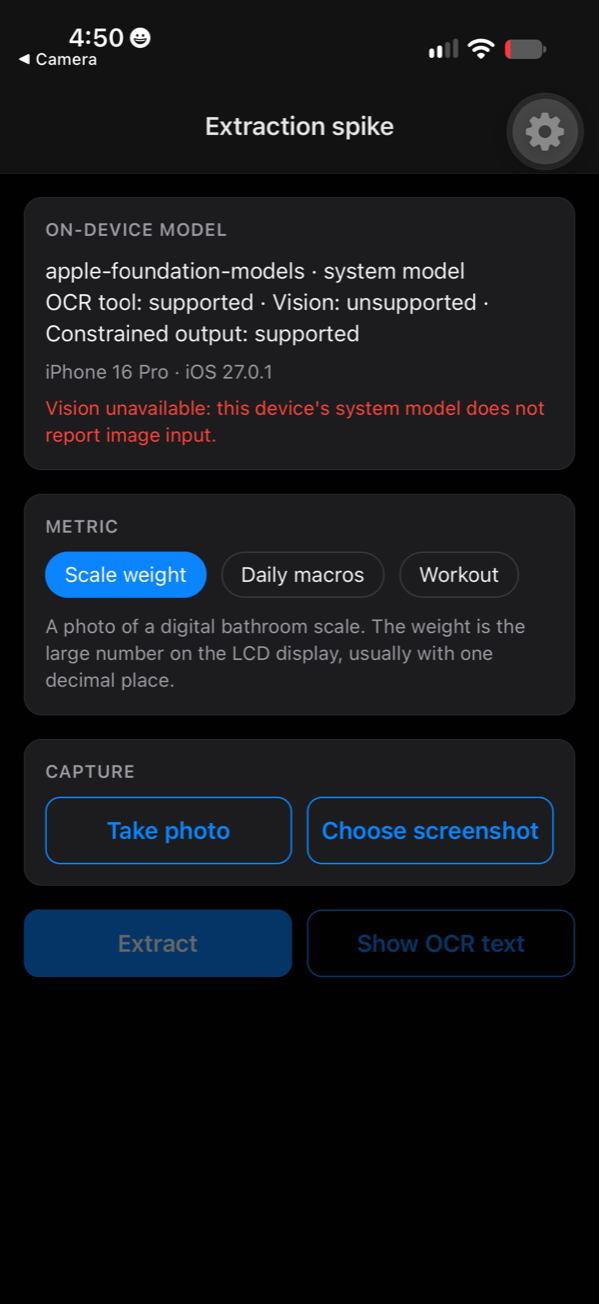
This felt like a dead end. It’s so lame. Am I supposed to go buy a new phone?
What’s Weird About It
I first read that Core is text-only, but that claim came from a GitHub issue, and it doesn’t hold up. Apple’s own post scores AFM 3 Core on image understanding, and a developer on an M2 Mac with 24 GB of RAM reports .vision as supported on the same base model. My iPhone 16 Pro, running that same base model, says no. I couldn’t find a single report of an 8 GB iPhone returning vision support, and Apple’s WWDC sessions and docs never say which devices get image input.
My best guesses, in order:
- A memory cutoff. Image input on the base model may need more than 8 GB of RAM. The M2 that worked has 24 GB, so this fits, but it’s an inference.
- An iPhone-specific restriction that Apple hasn’t mentioned.
I bet most people don’t know their phone has an on-device language model that any app can run, if you know how to get to it. I didn’t. As Apple keeps expanding it, I think there’ll be more and more use cases for it.
So Let’s Pivot
Instead of more extraction testing, I want to look at the models that actually ship on recent iOS devices. This is the kind of information Apple doesn’t put in its top-level marketing. It’s usually a snazzy ad about how the phone looks cool, the camera’s better, and the battery lasts longer. But I want to know about the models. That’s where a lot of the real advancement is, and we barely talk about it.
How the On-Device Model Has Changed
Apple doesn’t publish a per-device list of model capabilities, but you can piece the history together from its research posts, technical reports, and coverage.
| Year / OS | On-device model | What changed | Images through the developer API |
|---|---|---|---|
| 2024, iOS 18 | AFM on-device, ~3B parameters | First Apple Intelligence model, on iPhone 15 Pro and all iPhone 16s (8 GB RAM) | No developer API yet |
| 2025, iOS 26 | ~3B, compressed to 2 bits per weight | Memory savings across the board; 4,096-token context | No. Text in, text out; images only reached the model through OCR/barcode tools |
| 2026, iOS 27 | AFM 3 Core: 3B dense, improved | Preferred over the 2025 model on 45.6% vs 23.3% of text prompts, and on more than 61% of image-understanding comparisons | Yes, on some devices |
| 2026, iOS 27 | AFM 3 Core Advanced: 20B sparse, 1–4B active per request | Full model stored in flash, parts loaded into memory per request. Apple calls it “natively multimodal” but only names voices and dictation as uses | Needs 12 GB RAM: iPhone 18 Pro / Pro Max, iPhone Duo, iPhone 17 Pro / Pro Max, iPhone Air, M3 and newer Macs with 12 GB or more |
That jump from 3B to 20B parameters is huge, even though only 1–4B of them run at a time.
A few more things I found:
- The 2025 model could already see images. Apple’s 2025 technical report describes a ~300M-parameter image encoder. Apple used it for Visual Intelligence, like making a calendar event from a flyer, but kept it out of the developer API. So in round one, the model on my phone had an image encoder, and my app couldn’t use it.
- The hardware split comes down to memory. The iPhone 16, 16 Pro, and 17 have 8 GB of RAM. The iPhone 17 Pro and Air have 12 GB. The A19 Pro still has a 16-core Neural Engine like the A18 Pro, and its AI gains come mainly from accelerators added to the GPU.
- The iPhone 18 Pro is out, and it’s still 12 GB. The iPhone 18 Pro and Pro Max went on sale September 18, along with a foldable called the iPhone Duo. Their A20 Pro has a dual 16-core Neural Engine and, per Apple, 50% more memory bandwidth than the A19 Pro. RAM stays at 12 GB, which Apple doesn’t advertise but shows up in Xcode. Apple’s Apple Intelligence page lists the same advanced voice and dictation features for the 17 Pro and 18 Pro, so the new chip doesn’t add a model tier. The base iPhone 18 isn’t out yet. Reports put it in spring 2027.
- Storage: Apple’s support note says Apple Intelligence on iOS 27 takes up to 14 GB of storage on the iPhone 17 Pro, 17 Pro Max, and Air, and up to 8 GB on the others. Coverage puts the 18 Pro in the 14 GB tier too. Apple lists devices, not RAM, but those are the 12 GB phones. That’s pretty substantial.
- Context window: 4,096 tokens on base devices, which is the only number Apple documents. The developer who reported vision on an M2 says it’s 8,192 on M3 and newer Macs with 12 GB or more, and Apple’s WWDC sample prints 8192 as an example, so I’d expect the same on 12 GB phones.
How Hard Is It to Learn What Model Your Phone Has?
Pretty hard. Apple announces that the on-device model gains vision without saying which devices get it. The most reliable spec sheet is the runtime check, SystemLanguageModel.default.capabilities, which is exactly how my app was able to show me that notice. Apple’s reference docs for SystemLanguageModel don’t list that property yet, as far as I can find, even though it’s in the iOS 27 SDK. And Apple doesn’t surface any of this in Settings or a built-in app.
How AFM 3 Core Advanced Works
I wanted to learn more about the latest model, because the way it runs on a phone is clever.
The phone treats Core Advanced as a big library and only checks out the books a request needs. All 20 billion parameters sit in the phone’s flash storage. When a request comes in, a small router picks the 1–4 billion parameters the task needs, loads them into RAM once, and then the phone runs what is effectively a small, dense model.
Claude helped me build the film below in Remotion. It follows one nutrition screenshot through the phone, from the screen down to the chips and back out. The layout is stylized, and the memory and speed numbers are estimates.
My RTX 4080 Super doesn’t need that trick for a 20B model, because the whole thing fits in its 16 GB of VRAM (video RAM, the memory on the graphics card).
Nerd corner: RAM, flash, and VRAM from zero
Every device that runs a model has a hierarchy of memory. The closer the memory is to the processor, the faster and smaller it is.
- Registers and cache (SRAM): tiny amounts of memory built into the chip itself. Extremely fast, measured in megabytes. Nobody fits a model in here.
- RAM (DRAM): the working memory. The processor can only compute on data that’s in RAM (by way of the cache). It’s fast, but it’s wiped when the power goes off. “8 GB” or “12 GB” on a phone spec sheet is this.
- Flash storage (NAND): where your photos, apps, and files live. It keeps data with the power off and there’s a lot more of it (256 GB, 1 TB), but it’s much slower to read than RAM. The processor can’t compute from it directly, so data gets copied into RAM first.
RAM comes in a few flavors depending on the device:
- LPDDR (“low power” DDR) is what phones and most laptops use. The iPhone 17 Pro uses LPDDR5X.
- DDR is the regular system RAM in a desktop PC. My PC has 64 GB of it.
- GDDR is graphics memory, soldered next to a GPU and built for bandwidth. My 4080 Super has 16 GB of GDDR6X. This is the VRAM.
- HBM (high-bandwidth memory) is stacked right next to data center GPUs. It’s the fastest and most expensive of the bunch.
One more wrinkle: on an iPhone (and Apple Silicon Macs), the RAM is unified. The CPU, GPU, and Neural Engine all share the same pool. On my PC, the GPU has its own VRAM, and the CPU has system RAM, and data has to cross the PCIe bus to get between them.
Two numbers matter for running a model:
- Capacity: how much fits. If the model doesn’t fit in fast memory, part of it has to live somewhere slower.
- Bandwidth: how many gigabytes per second the memory can move to the processor. For generating text, this is usually the real speed limit, not compute.
The router comes from an Apple paper called Instruction-Following Pruning (IFP). It picks the slice once per request instead of once per token, because pulling weights out of flash for every token would be way too slow.
Nerd corner: how the router works
- A small mask-predictor network reads the prompt (“transcribe this”, “summarize this”) and decides which slices of the 20B network the task needs.
- Those slices, plus a set of shared experts that are always active, get combined into a dense model in RAM.
- Apple says it re-picks experts now and then during generation, but doesn’t say how often.
- In the paper, a 3B-active IFP model beat a 3B dense model by 5–8 points on math and coding and rivaled a 9B dense model. So you get close to a bigger model’s quality for roughly a small model’s running cost.
Normal mixture-of-experts (MoE) models, like the ones in data centers, re-pick experts for every token. On a phone, that would mean pulling weights from flash constantly. Apple says outright that NAND-to-DRAM bandwidth is too slow to swap weights token by token. Picking per request means one slow load up front, then fast generation from RAM.
The size of the slice depends on the job. Apple sets the active size per use case, from 1B to 4B, and its evaluations ran at 1B active. Dictation and voices probably don’t need the full 4B.
This builds on Apple’s LLM in a flash paper from late 2023, which ran models up to twice the size of available RAM by streaming weights from flash in large, contiguous chunks.
Why It Needs 12 GB
The active slice is small, around 0.25–2 GB by my rough math. What needs the 12 GB is everything around it: iOS, your open apps, the model’s working memory for your conversation (the KV cache), and room to load experts without pushing apps out. I’d guess the 3B Core model stays resident too, but Apple doesn’t say. On an 8 GB phone, that margin isn’t there.
Nerd corner: the rough math
Apple doesn’t publish bit widths or memory use for Core Advanced, so these are my estimates. Apple’s 2025 base model used 2 bits per weight, so I used a 2–4 bit range.
2-bit 4-bit Full 16-bit, for scale Full 20B model (in flash) ~5 GB ~10 GB ~40 GB Active 1B slice (in RAM) ~0.25 GB ~0.5 GB 2 GB Active 4B slice (in RAM) ~1 GB ~2 GB 8 GB This lines up with Apple’s storage note: up to 14 GB for Apple Intelligence on 12 GB phones versus 8 GB on others, consistent with a roughly 5–10 GB model sitting in flash.
Speed comes down to bandwidth. Generating each token means reading every active weight from RAM once, so the limit is how fast RAM can feed the chip, not how fast the chip can do math. The A19 Pro’s RAM (LPDDR5X-9600) moves about 76.8 GB/s:
- 4B active at 4-bit is ~2 GB per token, so at most ~38 tokens/s.
- 1B active at 4-bit is ~0.5 GB per token, so at most ~150 tokens/s.
Real speeds come in below these ceilings, but they show why the 1B setting exists: it’s fast enough for live dictation.
The iPhone 18 Pro’s A20 Pro has 50% more memory bandwidth, per Apple. That works out to roughly 115 GB/s by my math, which would lift both ceilings by about half: around 57 tokens/s at 4B and 230 at 1B.
I couldn’t find a figure for the iPhone’s flash read speed. If it’s a few GB/s, which is typical for phone storage, loading a 0.25–2 GB slice takes under a second, as part of the wait before the first token. Doing that every token would take about 0.2 seconds per token or worse, which is why it’s done once per request.
Compared With My RTX 4080 Super
My PC has an RTX 4080 Super with 16 GB of VRAM and 64 GB of system RAM. Here’s how it stacks up:
| iPhone 18 Pro | My PC | |
|---|---|---|
| Fast memory | 12 GB, shared by CPU, GPU, and Neural Engine | 16 GB GDDR6X VRAM on the GPU |
| Fast memory bandwidth | ~115 GB/s (my estimate) | ~736 GB/s (about 6× more) |
| Slow tier | Flash storage, a few GB/s (my guess) | 64 GB system RAM over PCIe 4.0 x16, ~32 GB/s |
| Fast-to-slow bandwidth ratio | roughly 30–60× | roughly 23× |
| Power | a few watts | the 4080 Super alone draws ~320 W |
The iPhone 18 Pro number is Apple’s 50% figure on top of the A19 Pro’s 76.8 GB/s, since Apple doesn’t publish the absolute bandwidth. Against last year’s iPhone 17 Pro, my card is about 10× ahead instead of 6×.
- A 20B model just fits on my card. At 4-bit, a 20B model is about 10–11 GB, so it sits entirely in VRAM. No flash streaming and no per-request routing needed. OpenAI’s gpt-oss-20b is the closest open equivalent: 21B total parameters, about 3.6B active per token, built to run in 16 GB. Since every expert stays in VRAM, it can switch experts every token, which the iPhone can’t afford.
- My PC has the same problem one level up. Load a model bigger than 16 GB, like a 70B model at 4-bit (~40 GB), and the leftover layers spill into system RAM. Each token then waits on PCIe and the system RAM bus, and speed drops sharply. That’s the same pattern the iPhone has between RAM and flash, with a similar ratio between the fast and slow tiers. Tools like llama.cpp handle it by splitting layers between the GPU and CPU. Apple handles it by choosing a slice once per request.
- My dictation setup is a smaller version of the same idea. I load Whisper large-v3 (~3 GB) into VRAM for each recording and free it afterward to keep room for ComfyUI. Apple does that with experts instead of whole models, on about 115 GB/s instead of 736.
- Raw speed goes to the PC by a wide margin. About 6× the memory bandwidth plus far more compute means the card would generate several times faster on a comparable model. The iPhone wins on watts per token, on fitting in a pocket, and on not needing a 20B model’s worth of fast memory at all.
Takeaways for Building on Apple’s On-Device Models
If you’re building an app on Apple’s Foundation Models, in Swift or through a wrapper like expo-ai, here’s what I’d keep in mind after two rounds.
- Check capabilities at runtime instead of the iOS version. The same iOS release runs different models on different phones. iOS 27 on my 16 Pro has no image input. Read
SystemLanguageModel.default.capabilities, or whatever your wrapper exposes, and give every feature a fallback. Test on real devices too, including the oldest one you support, because what works on one tier may not exist on another. - Know exactly what the model sees. With the OCR tool, the model gets plain lines of text with the positions dropped. That works for a clean screenshot like a nutrition summary. It breaks on tables, because nothing says which row a number came from. Pick the input path that fits your data, or keep the positions yourself before handing the text over.
- Validate what the model extracts. Guided generation makes sure the answer has the right fields. It doesn’t make sure the numbers are right. My scale photo got a confident 250 in round one. Check anything you save against something you trust, like recent readings, and let the user confirm or edit before it lands.
- Handle tool failures. In round two the model called the OCR tool four times on unreadable text and hit the tool-call limit. Catch those errors, cap retries, and fall back to something useful, like manual entry.
- Keep requests small. The context window is 4,096 tokens on base devices, and the text from a busy screenshot eats a lot of it. Ask for one thing per request and trim what you send.
Where My App Goes From Here
I have three ways forward:
- Model vision, which needs a 12 GB phone as far as I can tell. I’d have to buy a new phone.
- OCR with positions, so table rows stay together. This one works on my phone today, and I could do some tinkering.
- A cloud model, which defeats the point of this whole experiment.
The app is in good shape for the next phase. Clean screenshots work in OCR mode, which covers my macros from MyFitnessPal. Rejecting a scale reading more than about three pounds off my recent ones, plus manual entry as a fallback, should handle the scale. Although manual entry kind of defeats the point. But really, I want to combine all this data. Being able to pull in just one source isn’t that useful. The whole goal is to consolidate data siloed across different apps, which is what makes it tough to manage.
This post could just as well be called testing hardware. I assumed I’d get the new image input when I installed iOS 27. iOS 26 already had an image encoder that developers couldn’t reach, and iOS 27 opened it up, just not for my phone. I think it makes sense that Apple’s own features get these capabilities first, so I’d expect the public API to keep lagging a bit behind.
Making Big Models Fit
My 4080 Super has 16 GB of VRAM. For my AI animation project, I’ve run a 22-billion-parameter video model on it, LTX-2.5, and Wan 2.2, a mixture-of-experts model with about 27 GB of weights. Some of that came after I wrote that post, so you won’t find Wan or the quantized builds in it. Neither model fits as is. I got them running the same basic way Apple gets Core Advanced onto a phone: store the weights smaller, keep only part of the model in fast memory, and move the rest in and out.
Apple’s version is the library from earlier in this post. The full 20B model sits in flash, and each request loads a 1–4B slice into RAM. Mine is cruder, but it’s the same problem. The model is bigger than the fast memory, so the rest lives somewhere slower and only what’s needed gets pulled in.
Nerd corner: the tricks, on the phone and on my 4080
- Quantization. Store each weight in fewer bits. Apple’s 2025 on-device model used 2 bits per weight. I ran LTX in int8 instead of bf16, Wan and Flux in fp8, and a shot-review model in 4-bit.
- Mixture of experts. Split the model into experts and only run some of them. Core Advanced runs 1–4B of its 20B. Wan 2.2’s 14B model has two experts, and only one sits in VRAM at a time while the other waits in system RAM. That’s how about 27 GB of weights runs on a 16 GB card.
- Offloading. Keep weights in slower memory and stream them in. On the phone that’s flash to RAM. On my PC it’s ComfyUI’s low-VRAM mode streaming LTX through system RAM.
- Pruning per request. Core Advanced’s router picks which specialists a request needs before it starts writing, so the rest never loads.
- Distillation. Train a model to copy a bigger or slower one. For video that usually means fewer steps. LTX’s distilled version and Wan’s 4-step LoRAs cut render time a lot. Without the 4-step LoRAs, Wan runs about 6 times slower.
- One model at a time. My renders run in two phases, images first and then motion, because both models can’t sit in 16 GB at once. Text-to-speech runs on the CPU so it never takes VRAM.
The hardware got better too, but most of what made these fit came from people working out new tricks. I think that’s where a lot of the progress on local models is going to keep coming from. People keep finding ways to store weights in fewer bits, run less of the model at a time, and move weights around smarter, and those tricks stack. So I’d guess the models you can run at home will keep getting more capable faster than the hardware does.
The tricks cost something, though. I still had to run LTX at 768×512 instead of HD, and 2-bit weights lose some precision. Core Advanced still needs a 12 GB phone. The biggest models will probably stay in data centers, and what seems to be changing is how much you can do without them. For my animation work that matters a lot. A five-second clip costs me about half a cent in electricity at home, versus 2 on a cloud video API.
FAQ
What Does It Mean for the Model to Live in Flash?
Flash is the phone’s storage, the same chips that hold your apps and photos. The model’s weights sit there as a file, the way a game’s data does. The chip can’t do math on anything in flash directly. It has to copy the numbers into RAM first, and reading from flash is a lot slower than reading from RAM. So the full 20B model is stored on the phone all the time, but only the pieces a request needs get copied into RAM to actually run.
How Does OCR Get the Text Out of an Image?
OCR stands for optical character recognition. On iOS, Apple’s Vision framework does it. It finds the parts of the image that look like text, reads the characters in each one, and gives back its best guesses along with a confidence score and where the text sits in the image.
expo-ai’s OCR tool asks Vision for its accurate mode, keeps the top guess for each piece of text, and joins them with line breaks. The positions get dropped along the way. That’s why my workout came out wrong. The model got a list of numbers with no way to tell which row each one came from.
Does OCR Use the Same Model?
No. Vision’s text recognition runs its own small neural network that’s part of iOS, separate from the language model. It’s built for one job, finding and reading text, so it can be a lot smaller. Apple doesn’t publish its size. It runs on the phone’s chip like everything else here, but Apple doesn’t say which part of the chip handles it.
So my request actually used two models in a row. Vision’s model read the screenshot, then the language model read the text Vision handed over.
Is the Router Part of the Phone's Chip?
No. The router is part of the model itself, a small network that ships with it. It runs on the phone’s chip, the A20 Pro in the film, like the rest of the model does. Apple describes it as a lightweight block that reads the request and picks which experts to load. In the film it sits on the chip because that’s where it runs. It isn’t a separate piece of hardware.
What's the Block in the Middle of the RTX 4080 Super?
That’s the GPU chip, the AD103. It does the math, the same job the A20 Pro does on the phone. The eight blocks around it are memory chips, 2 GB each, which add up to the card’s 16 GB of VRAM.
Is the 4080 Super Holding Eight Copies of the Model?
No, it’s one copy. The card’s memory is split across eight chips, and each one has its own connection to the GPU chip. That’s a big part of how the card gets to about 736 GB/s. A 20B model at 4-bit is about 10 to 11 GB, so it gets spread across all eight, roughly a slice on each.
Would My App Get Core Advanced on an iPhone 17 Pro or 18 Pro?
I don’t know, and as far as I can tell Apple doesn’t say. Apple names Siri’s voices and dictation as what Core Advanced powers, and its Apple Intelligence page lists those for the iPhone 17 Pro, 17 Pro Max, iPhone Air, 18 Pro, 18 Pro Max, and iPhone Duo. The film runs my nutrition screenshot through it to show how it works. That’s an illustration, and I can’t say my app would actually get it.
Glossary
Terms used in this post
- Bandwidth. How many gigabytes per second memory can move to the chip. For generating text, it’s usually the real speed limit.
- Bits per weight. How many bits store each parameter. Fewer bits makes a smaller model that’s a bit less precise. Apple’s 2025 on-device model used 2.
- Dense model. A model that uses every parameter for every token.
- Flash storage (NAND). The phone’s storage. It keeps data with the power off and holds a lot, but it’s much slower to read than RAM.
- GPU chip. The processor on a graphics card that does the math. On the 4080 Super it’s the AD103.
- KV cache. The model’s working memory for the current conversation, kept in RAM so it doesn’t redo work for earlier tokens.
- Mixture of experts (MoE). A model split into many smaller parts, called experts, where only some of them run for a given input.
- OCR. Optical character recognition. Software that finds text in an image and turns it into strings.
- Parameters (weights). The numbers a model learned during training. “20B” means 20 billion of them.
- RAM (DRAM). The working memory the chip computes from. It’s fast, but it’s wiped when the power goes off. The phone’s “12 GB” is this.
- Router. The small part of Core Advanced that reads a request and picks which specialists to load.
- Shared experts. The parts of Core Advanced that every request uses.
- Sparse model. A model that only uses some of its parameters at a time. Core Advanced has 20B but runs 1–4B per request.
- Specialists (routed experts). The parts of Core Advanced that only get loaded when the router picks them for a task.
- Token. A chunk of text the model reads or writes, often a word or part of one.
- Vision framework. Apple’s on-device image toolkit. Its text recognition uses its own small model, separate from Apple’s language model.
- VRAM. The memory on a graphics card. My 4080 Super has 16 GB of it.
Sources
Apple:
- Introducing the Third Generation of Apple’s Foundation Models (Apple ML Research)
- Apple Intelligence Foundation Language Models Tech Report 2025 (arXiv 2507.13575)
- Instruction-Following Pruning for Large Language Models (arXiv 2501.02086)
- LLM in a Flash: Efficient LLM Inference with Limited Memory (Apple ML Research)
- What’s new in the Foundation Models framework, WWDC26
- What’s new in image understanding, WWDC26
- Analyzing images with multimodal prompting (Apple docs)
- RecognizeTextRequest (Apple Vision docs)
- expo-ai’s OCR tool source (expo/expo)
Coverage:
- Apple’s third-generation Foundation Models explained (9to5Mac)
- Your phone may run iOS 27, but only these devices support the new Siri AI (Yahoo Tech)
- Apple Intelligence can take up to 14GB on iOS 27 (The Mac Observer)
- iOS 27 Advanced AI Dictation: which iPhones can run it (Gadget Hacks)
- Foundation Models image input in iOS 27 (Blake Crosley)
Developer reports:
- apfel issue #510: M2 on macOS 27.0.1 reports vision
- AnyLanguageModel PR #206: OS 27 image attachments and capabilities (closed, not merged)
Hardware and comparison:
- GeForce RTX 4080 family specs (NVIDIA)
- gpt-oss README (OpenAI)
- GeForce RTX 40 series (Wikipedia)
- LTX-2.5 model card (Lightricks)
- Wan 2.2 README (Wan-Video)
- Apple debuts iPhone 18 Pro and iPhone 18 Pro Max (Apple Newsroom)
- Apple Intelligence compatible devices and features (Apple)
- iPhone 18 Pro and Pro Max RAM (MacRumors)
- iPhone 18 split launch across 2026 and 2027 (PhoneArena)
- Apple A20 Pro (Wikipedia)
- Apple A19 (Wikipedia)
- A19 vs. A19 Pro chip differences (MacRumors)
- iPhone 17 Pro (Wikipedia)