I was recently reading through some blogs on daily.dev and saw that Expo had shipped a batch of new features. Having built with Expo before, I went back to see where their feature set stands in 2026, and it’s come a long way. One PR in particular caught my eye: it adds a new expo-ai package that lets apps use Apple’s on-device language model through the Foundation Models framework. Because I like working in TypeScript over Swift, that sparked my interest, and I wanted to try building an app with it.
I thought of a use case: an app that tracks some of the metrics I think about in daily life, like my weight, calories, and other macros. The idea is to use the on-device LLM to read a photo of, say, the scale, or a screenshot from another app, and save that data right in the app, in a SQLite database on the phone, with my own screens for looking back at it. I’d also use Expo to ship builds through CI rather than managing signing and provisioning by hand in Xcode, which has never been my favorite part of iOS development.
I’m using Opus 5.5, and I made a plan for a basic MVP:
- Photos. Take a photo in the app, extract the information with Apple’s on-device model, then toss the photo so it doesn’t get stuck in your photo library.
- Screenshots. Do the same thing with a screenshot.
- Storage. Save everything it extracts to a local SQLite database, so it all lives in the app.
- Display. Build my own UI for viewing the data I’ve stored.
Usually I do this stuff by hand and it’s just so tedious. I want to point my phone, take a photo or a screenshot, and be done. I’m also excited because it’ll give me some more experience with the latest Expo features.
Using on-device AI is a real power move for the future. Not having to hook up to the OpenAI or Anthropic APIs reduces the cost and simplifies the implementation. I tried this about a month ago with a voice note-taking app and it worked pretty well. Apparently it has a ways to go before it matches actual frontier models, but my idea only needs image data extraction, and apparently that’s already an established feature.
Nerd corner: how the on-device model actually works
Here’s how the pieces fit together, from my TypeScript down to the chip:
easyIngest (React Native / TypeScript)
   │  generateAsync({ images, tools: [Tools.ocr], schema })
   ▼
expo-ai (Swift module)            ← turns JS calls into Swift calls
   ▼
Foundation Models framework       ← Apple's public API to the system model
   │   ├─ tool calling → Vision framework (OCR)   [iOS 26]
   │   └─ image input  → model sees pixels         [iOS 27]
   ▼
System language model             ← one shared model, owned by iOS
   ▼
Apple silicon (Neural Engine / GPU)
The big thing to understand is that the model is built into iOS. Every app shares the same one, so it adds nothing to your app’s size. The trade-off is you don’t get to pick it or tune it. Apple owns it and updates it with the OS.
It’s also not on every phone. It only shows up on Apple Intelligence devices (iPhone 15 Pro and newer), and only once it’s turned on and finished downloading. So the first thing the app has to do is ask whether it’s available.
As for the model itself, the iOS 26 version is about 3 billion parameters, squeezed down to 2 bits each so it fits on a phone. It runs right on the device, so nothing leaves the phone, it works offline, and it doesn’t cost anything per request. That’s the power move. It’s way smaller than the frontier models, though, so it’s good at reading text and filling in fields and not so good at heavy reasoning.
Expo’s new
expo-aipackage wraps Apple’s Foundation Models framework, and there are three parts I actually care about for this app:
- Sessions keep the instructions and the history, but on iOS 26 the context window is only 4,096 tokens, so a busy screenshot eats a lot of it.
- Guided generation forces the answer into a schema I give it. That guarantees the shape of the answer, not that the numbers are right. I learned that one with my scale.
- Tool calling lets the model call functions I hand it.
Tools.ocris one of them. Under the hood it’s Apple’s Vision framework reading the text, and the model gets that text back. On iOS 27 the model can look at the image itself, but the app has to be built with the newer Xcode toolchain to get that.Looking back, this explains pretty much everything in my tests below. Clean screenshots work because Vision reads them perfectly. The scale fails because Vision can’t read those segmented LCD digits, so the model is filling in a guess from junk text. My guess on the workout taking 17 seconds is that the model just has a lot more to write out.
One cool thing:
expo-aiisn’t only Apple. The same JavaScript API also covers Gemini Nano on Android and the browser’s Prompt API.
It’s not even on npm yet
Turns out expo-ai hasn’t shipped in an Expo release yet, not even a canary. It’s merged into main in #49997, though, so I was able to grab that code and use it manually.
I’m also on SDK 58, which is still a prerelease (it’s on npm’s next tag, and latest is still SDK 57), so I expected a few rough edges. Sure enough, the starter template doesn’t install as is: Reanimated 4.7.0 rejects React Native 0.88.0-rc.3. The funny part is that create-expo-app still prints ”✅ Your project is ready!” after the install fails, and you’re left with no node_modules. I worked around it with legacy-peer-deps=true in an .npmrc, but it seemed like a real issue, so I logged it as a to-do. When I came back to it, someone already had a fix up for that one in #50998.
While digging in, though, I found a second problem: expo-modules-core declares a react-native-worklets peer range that stops at 0.10, but SDK 58 ships 0.13. So npm installs a second nested copy of worklets, and strict installs fail outright. I opened #51017 to widen the range. As for the “project is ready” message, Expo already fixed that one in #48946. It now warns you that node_modules is missing. That fix is in create-expo 5.1, which is still on the next tag while latest is 5.0.3, which probably explains why I still saw it.
Two Apple accounts, one subscription
Next up was my Apple account. I have two, and one has a domain that got switched, so logging in is extra confusing. After some debugging I found the account with the active subscription, thank goodness. Logging in through the EAS CLI was super easy. I validated all of my account settings and got set up. What a dream. Expo has clearly put a lot of polish into this login flow through the CLI. It’s really quite nice.
“Its integrity could not be verified”
I compiled the first version of the app with Fastlane and scanned a QR code to get a development build onto my device. Initially I had only registered my MacBook, so I needed to register my actual phone before I could install on it. That wasn’t too difficult. I grabbed the device ID, set it up, and kicked off another pass through the build, hoping I’d be good to go.
Instead, after a successful Fastlane build, I ran into:
Unable to install app because its integrity could not be verified.
So I spent a while aligning my registered devices and provisioning profiles.
While I was debugging and waiting on builds, I realized I could probably use this to pull the macros off of nutrition labels instead of having to use MyFitnessPal. Something to think about later.
While I waited: how EAS actually builds the app
While the builds were running, I got curious about what the EAS CLI is actually doing to get my build up to Expo’s servers and back down onto my phone.
So, building an iOS app needs macOS, Xcode, and Apple’s signing credentials. Instead of making you deal with all that, EAS rents a fresh Mac for every build and manages the certificates for you. The CLI handles the credential checks and logging in, packs the project into an archive, and uploads it. I had a hunch it landed in a Google Cloud Storage bucket, and sure enough, the EAS CLI source uploads the project tarball to GCS. Then the build gets added to a queue on their backend.
According to Claude, that Mac then runs through a series of commands to do the actual build. It uses Fastlane
gym, which compiles the app the same way archiving does in Xcode, then exports and signs it as an.ipa. The certificate and profile handling is EAS’s own code, though, not Fastlane’s.Getting it onto my phone is the part that bit me. The build page gives you a link that installs the app over the internet, and at install time iOS checks the phone’s UDID against the list of devices in the provisioning profile. If your phone isn’t on that list, you get exactly the integrity error I was staring at.
Once I got devices and profiles lined up, I got past that error and was able to open the app.
I’m running my local development server, and for some reason the app couldn’t find it automatically, so I had to enter it manually. But then it connected to the build. Wonderful. I’ve finally loaded my app.
Oh my gosh, we’re here.
One correction before the results: in these first tests the system model never saw the image itself. On iOS 26, Apple’s Vision framework reads the text and hands it to the model, which fills in the fields. Letting the model look at the image directly needs iOS 27, so that’s the next round.
I tested three things, in increasing order of difficulty:
- A photo of my scale. A single number.
- A screenshot of MyFitnessPal. Several numbers.
- A screenshot of my workout sheet. The most complex: exercise names, sets, reps, and weight.
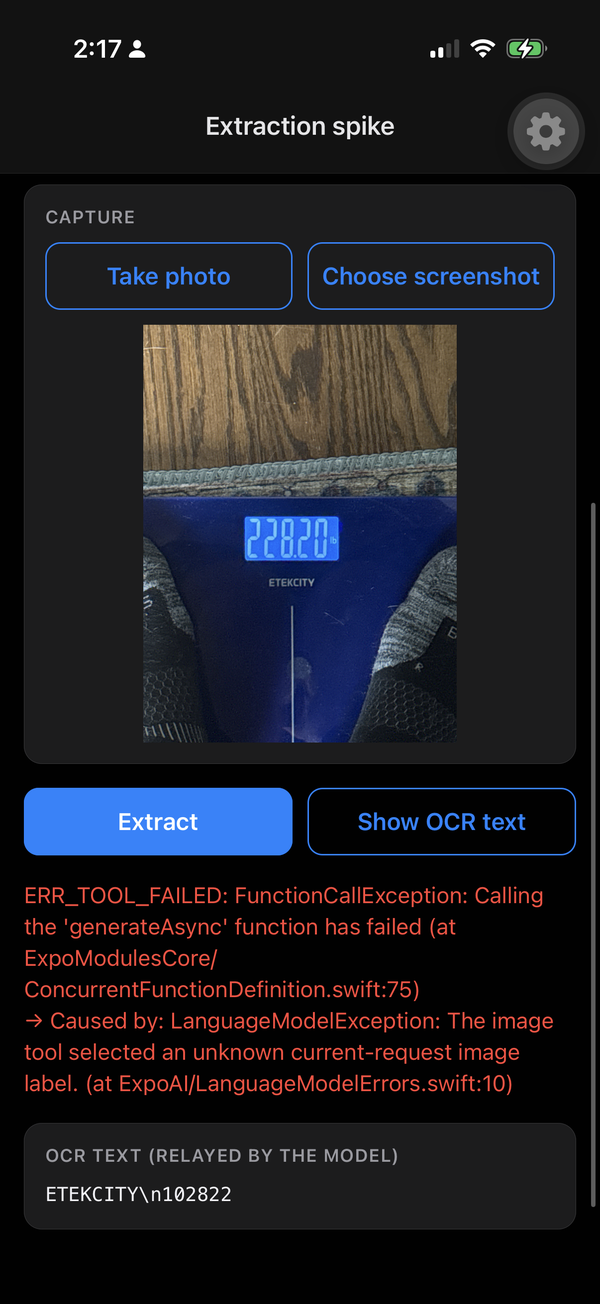
2:17pm, the scale. The first tries didn’t even get to a number. generateAsync from expo-ai threw ERR_TOOL_FAILED, caused by a LanguageModelException: “The image tool selected an unknown current-request image label.” The OCR text it relayed back was ETEKCITY and 102822, so Vision wasn’t reading the display right either.
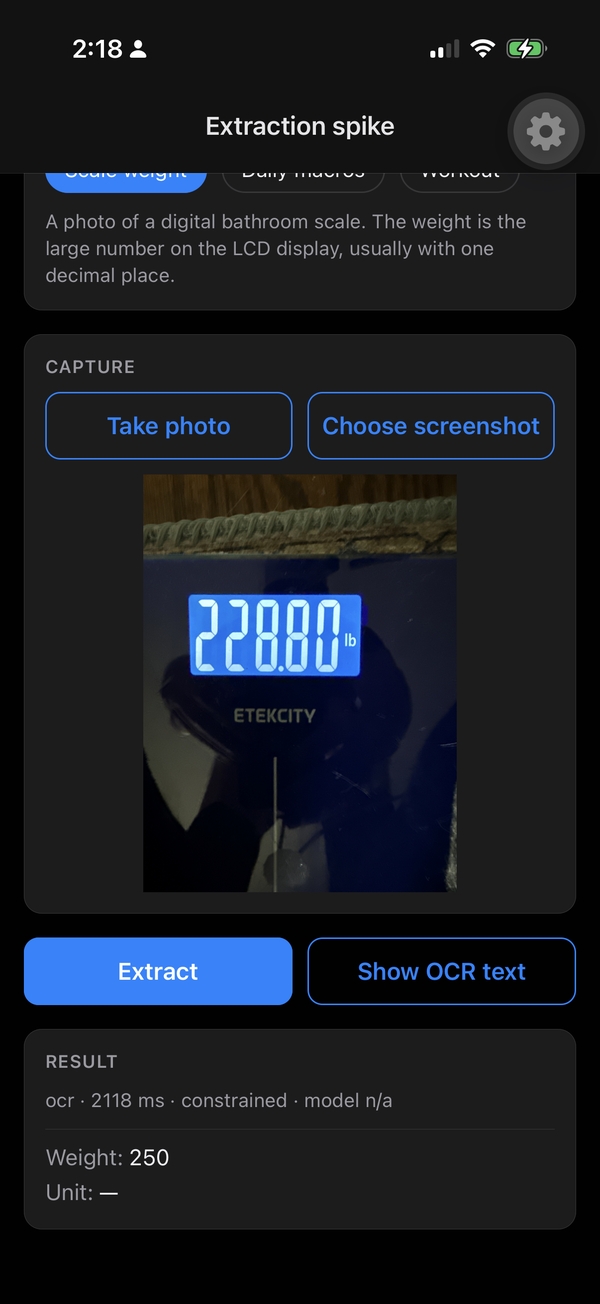
2:18pm, the scale again. This time it came back with a weight, just the wrong one. The scale says 228.8 and it read 250. Apple’s text recognition just can’t read the scale’s digits very well.
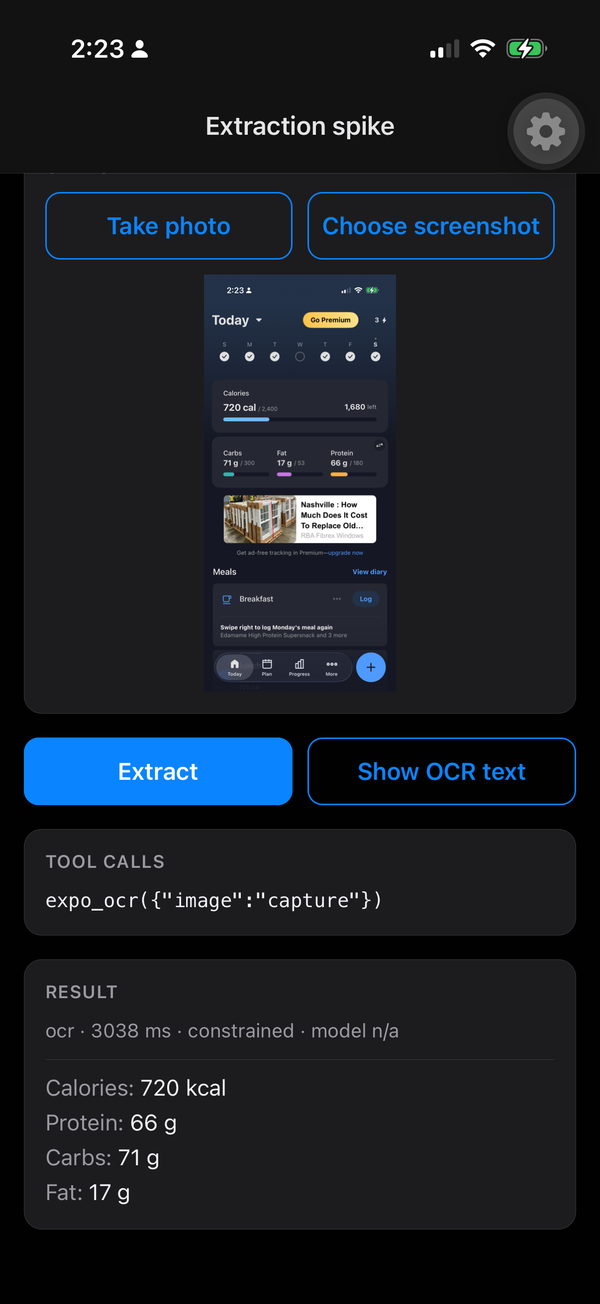
2:23pm, MyFitnessPal. A success. It accurately extracted calories, protein, carbs, and fat, which is great.
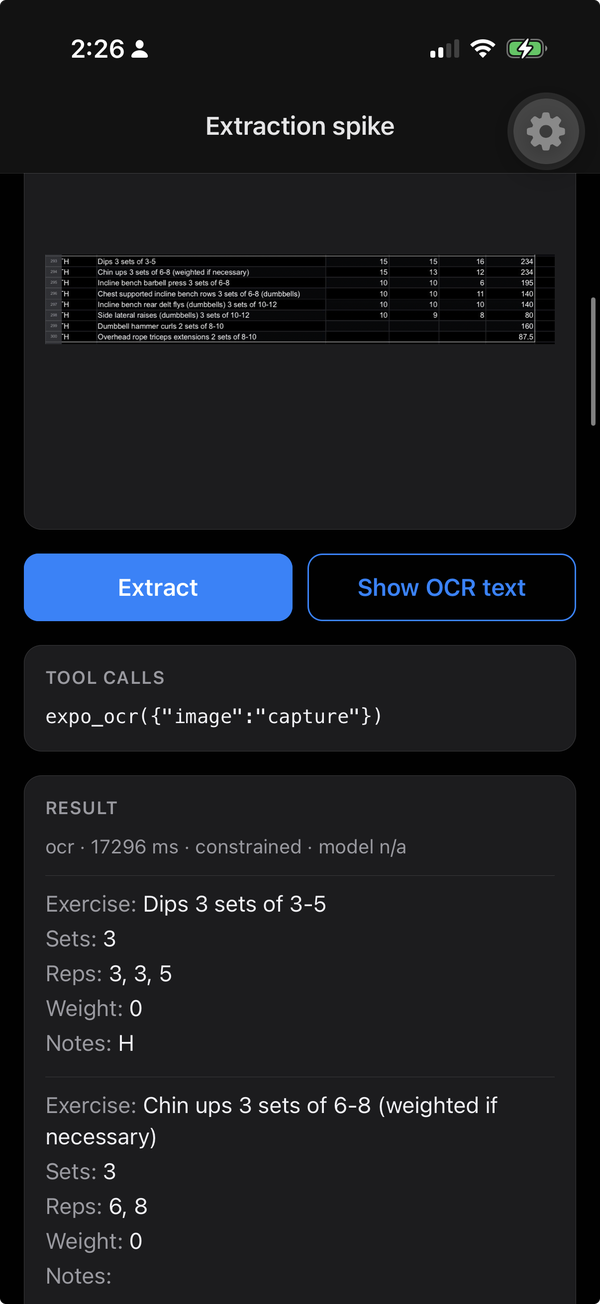
2:26pm, the workout. It got the names of the exercises but missed all of the reps and weights. Looking closer, it pulled the reps straight out of the exercise names (“3 sets of 3-5”) instead of the actual columns, and every weight came back as 0. It was the most complex data set of the three, so not too surprising.
The goal is to have all of this data living in the app. That includes the workouts. Right now they live in a spreadsheet, but I’m going to start pulling them into the app by screenshot, so getting that extraction right actually matters. For this test it was good to have a range: a single number from a photo, several numbers from MyFitnessPal, and then the full workout with names, sets, reps, and weight.
Still on the list
- Rerun these tests on iOS 27, with the model looking at the image directly.
- Save the extracted data to a local SQLite database.
- Build the screens for viewing that data.
- Get the workout extraction good enough to start moving my workouts out of the spreadsheet and into the app.
- Try nutrition labels.
- Get #51017 reviewed and merged 🤞. It’s a tiny change, but it would be cool to get a contribution into Expo.
While I was finishing up this post, I installed iOS 27 on my phone. Next up is rerunning these tests against Apple’s on-device model on iOS 27, where it can actually look at the image, to see if we get better results. Especially on that scale.
This was an exciting little experiment for an afternoon. Not bad for two-ish hours.
Quick side note: this whole post started as me talking out loud while I worked. I’ve got a speech-to-text model running locally on my Linux machine, and it’s honestly really good. I’d hit a key, say what I was seeing, hit it again, and get back to the code. That’s what let me write this while doing the actual development instead of trying to remember it all afterward.
How my dictation setup works
It’s a little push-to-talk script bound to F9 in GNOME. It’s modeled on nerd-dictation, which only supports VOSK, but I swapped in Whisper for accuracy.
- Model: faster-whisper, a CTranslate2 port of Whisper, running
large-v3in float16 on my RTX 4080 SUPER. Fully offline, about 3 GB of weights.- Recording: the first F9 starts
pw-record(PipeWire) capturing 16 kHz mono audio from my Logitech C920 webcam mic. The second F9 stops it.- Transcribing: voice activity detection trims the silence off both ends, and conditioning on previous text is turned off so the dictation doesn’t run away with itself.
- Typing:
xdotooltypes the text into whatever window has focus, whether that’s the editor, the terminal, or a chat.One choice I like: it loads the model for each recording and frees the GPU memory afterward, which costs about 3 to 4 seconds each time. That’s on purpose. The same GPU renders AI video in ComfyUI, and I’d rather keep about 4 GB of VRAM free than have zero latency.
I also tried my AirPods as the mic. Don’t. The Bluetooth mic drops out after about a second and a half on Linux.
I’m excited to continue tomorrow, and maybe I’ll do another recording of my experience.