This is a history lesson I wrote for myself while learning Linux isolation for AI agents. Before going deeper into namespaces, cgroups and seccomp, I wanted to understand what a kernel actually is, where the word comes from, and how the systems I use every day grew out of the same family tree. Along the way I’ve been running small experiments in a Linux container on my Mac, so you’ll see that lab come up. I researched and drafted this with Claude, then checked every claim against the sources listed at the end.
                    Unix (Bell Labs, 1969)
                   /                      \
        BSD (Berkeley, late 1970s)     the Unix "design" (POSIX standards)
         /            \                           \
   FreeBSD ...     NeXTSTEP (Steve Jobs' NeXT)     Linux (Torvalds, 1991)
                          |                        written from scratch to
                     macOS (2001-)                 *behave* like Unix
                     kernel: XNU                   no shared code
1. What a Kernel Is, and Where the Word Comes From
The word. “Kernel” is an old English word for the soft, edible core inside a nut or seed, the part the hard outer layer protects. It comes from Old English cyrnel, roughly “little grain.” Before computers it also had a figurative meaning: the central, most important part of something, as in “a kernel of truth.”
The computing meaning borrowed both senses. In the 1960s, operating-system designers started splitting their systems in two. A small, trusted core did the essential, dangerous work: controlling the hardware, sharing out memory and CPU time, keeping programs from interfering with each other. Everything else sat around it. At first that core was often called the nucleus: IBM used the word for its System/360 software in the mid-1960s, and Per Brinch Hansen’s 1970 paper “The Nucleus of a Multiprogramming System” made it famous. By the early 1970s the word kernel was in common use for the same idea. Either way, it’s the small, protected center that everything else depends on.
It has a matching word: the shell. In the same era, the shell, the program you type commands into, was named. Louis Pouzin coined it around the end of 1964, naming the command language he proposed for the Multics project. In his words, he “coined the word ‘shell’ to name it.” Together the two words make one metaphor:
      ┌─────────────── shell ───────────────┐   what you touch: you type here
      │   ┌─────── user programs ───────┐   │   (bash, ls, opencode...)
      │   │      ┌─── kernel ───┐       │   │   the protected core: hardware,
      │   │      │              │       │   │   memory, rules
      │   │      └──────────────┘       │   │
      │   └─────────────────────────────┘   │
      └─────────────────────────────────────┘
The modern definition: the kernel is the core program of an operating system. It runs in the CPU’s privileged mode, controls all the hardware, and decides what every other program is allowed to do. Programs ask it for things through system calls.
The nut image still fits surprisingly well. The kernel is small compared to everything around it, protected by layers, and the part that matters most. If something gets into it, everything is compromised, which is exactly why agent sandboxing is about keeping untrusted code out of the kernel.
2. Before Unix: Sharing One Big Computer
Computers were rare, huge, and used one job at a time. In the 1950s and early 1960s, a university or company might own a single computer the size of a room. You didn’t sit at it. You wrote your program on punched cards, handed the deck to an operator, and came back hours later for a printout. The computer ran one job after another, in a queue. This was called batch processing. If your program had a typo, you found out the next day.
Then came time-sharing. The idea: connect many terminals to one computer and switch between users so fast that everyone feels they have the machine to themselves. MIT demonstrated one of the first such systems, CTSS (Compatible Time-Sharing System), in November 1961, led by Fernando Corbató.
Time-sharing created the problem this whole series is about. Once many people’s programs ran on the same machine at the same time, the system had to answer new questions:
- How do you stop one user’s program from reading another user’s data?
- How do you stop one buggy program from crashing everyone?
- How do you share out CPU time and memory fairly?
That’s the job of the kernel: a small, trusted core between every program and the hardware. Isolation between programs isn’t a container-era idea. It’s as old as computers being shared. An agent sandbox today answers the same questions CTSS did, about a different kind of untrusted user.
Multics: the ambitious successor. Starting in 1964–65, MIT teamed up with General Electric and Bell Labs (AT&T’s research lab) to build Multics, the Multiplexed Information and Computing Service. It aimed to be a computing utility, like electricity: always on, shared by many, and secure. Multics introduced or popularized ideas that are still everywhere:
- The hierarchical file system: folders inside folders (described in 1965, and generally credited as the first).
- Protection rings: layered privilege levels, with the most trusted code in the innermost ring, ring 0. Multics originated the ring model and that numbering, and its later processor enforced the rings in hardware. That’s where “ring 0” for the kernel comes from.
- The shell: Pouzin’s name, from section 1.
- Security as a design goal from day one.
Bell Labs walked away. Multics was ambitious, and it was late, complex and expensive. In April 1969, Bell Labs pulled out of the project. A few of its researchers, notably Ken Thompson and Dennis Ritchie, had liked using a shared, interactive system and didn’t want to lose it.
3. Bell Labs, 1969: Unix
A game and an unused computer. After Bell Labs left Multics, Ken Thompson had written a game called Space Travel, which simulated flying around the solar system. Running it on the lab’s big shared machine was expensive, so he moved it to a little-used computer in the corner: a DEC PDP-7. Getting the game running meant writing a lot of low-level code for that machine from scratch, and that code was the start of an operating system.
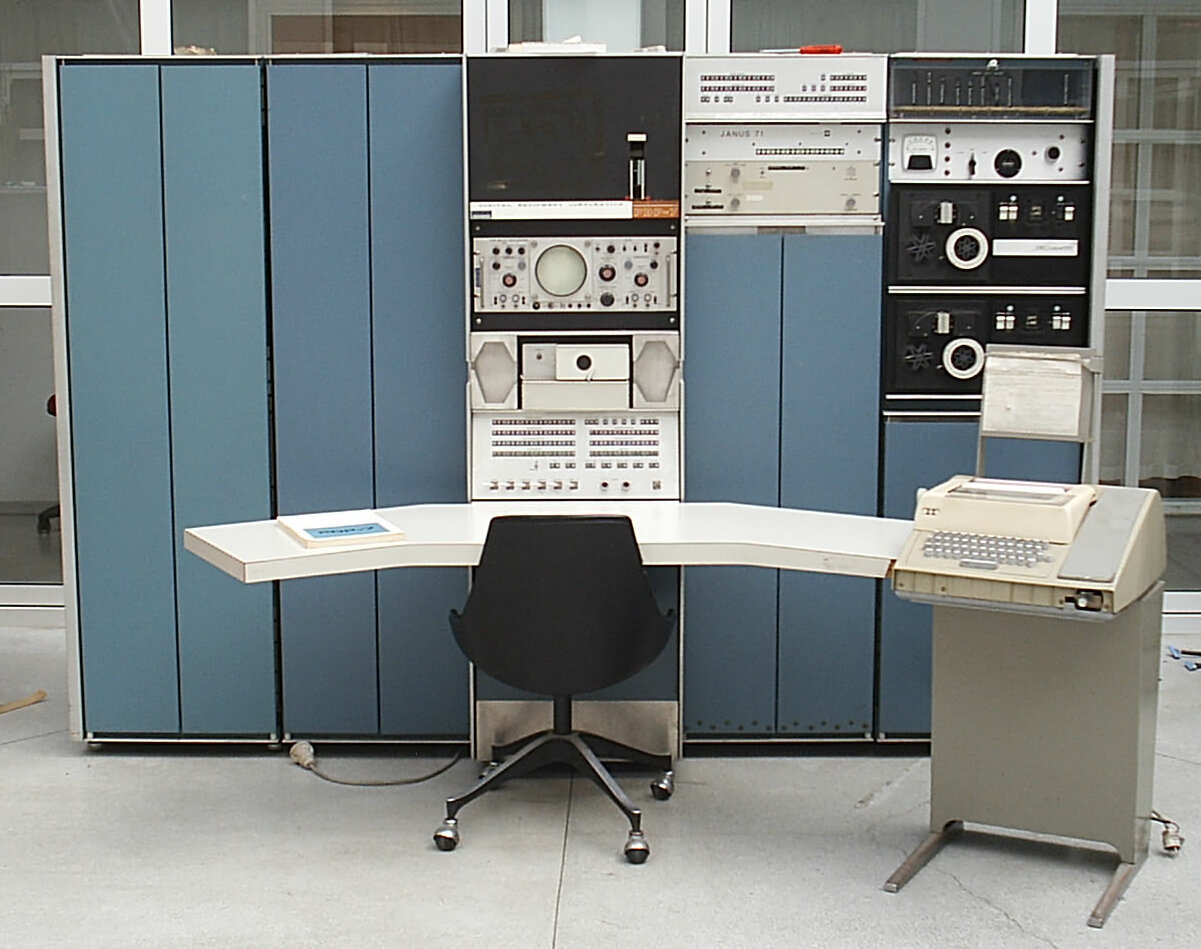
A PDP-7, the same model Unix was born on. This one is in Oslo, photographed in 2005 before its restoration. Photo by Toresbe, via Wikimedia Commons, CC SA 1.0.

A month in the summer of 1969. As Thompson later told it, his wife took their baby son to visit his parents in California, and “she was gone a month.” He used the time to write the pieces needed for a working system: “I allocated a week each to the operating system, the shell, the editor, and the assembler.” By the end he had a small, usable, interactive system on a computer nobody else wanted. Dennis Ritchie joined him, and others at Bell Labs soon started using it.
The name is a joke about Multics. Multics was the Multiplexed Information and Computing Service. The new, much smaller system got called “Unics”, the Uniplexed version, a pun suggested by Brian Kernighan in 1970. Ritchie later called it “a somewhat treacherous pun.” The spelling soon became Unix. Multics tried to do everything, and Unix aimed to do less, well.
It earned its keep by formatting patents. In 1970 the team wanted a bigger machine, the newer PDP-11. They made the case to management with a practical use: a text-processing system for Bell Labs’ patent department. It worked. Unix got its new computer, and real users. Ritchie and Thompson’s 1974 paper lists “the preparation and formatting of patent applications” among its first jobs, and says the earliest version “ran on the Digital Equipment Corporation PDP-7 and -9 computers.”
The Unix philosophy. Unix’s ideas outlived its code:
- Small programs that each do one thing well.
lslists,wccounts,grepsearches. - Pipes (
|), added in 1973 (Version 3) at Doug McIlroy’s urging, and implemented by Thompson “in one feverish night”: connect small programs into bigger ones. In my lab,ps -e | wc -lis a 1973 idea. - Everything is a file. Devices are presented as files, and later Unix versions extended the idea to running processes with
/proc(1984), which Linux adopted. That’s why, in my lab, I could read a process’s namespaces from/proc/self/nsand its seccomp status from/proc/self/status.
The kernel, Unix-style. The Unix kernel was small on purpose. It handled the hardware, processes, memory and files, and everything else (the shell, the editor, the tools) ran as ordinary programs outside it. That split, a small trusted core with replaceable tools around it, is the shape every system in this story inherits.
4. Unix Spreads: C, and a Company That Couldn’t Sell It
The problem with assembly. The first Unix was written in assembly language: instructions for one specific kind of CPU. Moving it to a different computer meant rewriting nearly all of it. Back then, operating systems were tied to the machines they were born on.
Dennis Ritchie creates C. Around 1971–73, Ritchie developed the C programming language, which grew out of an earlier language of Thompson’s, called B. C sat at a useful middle level: high enough to write readable, structured code, low enough to work directly with memory and hardware, which a kernel needs.
1973: the kernel is rewritten in C. This was the breakthrough, and it shipped in Unix’s Fourth Edition, in November 1973. Unix became one of the first operating systems with its kernel written mostly in a high-level language. Moving it to new hardware now meant rewriting only a small machine-specific part and recompiling the rest. Portability is a big reason Unix spread, and every kernel in the rest of this story is written in C for the same reason. The Linux kernel is still mostly C today.
AT&T couldn’t sell computers. Bell Labs belonged to AT&T, the US telephone monopoly. Under a 1956 legal agreement with the US government (a consent decree), AT&T was kept to the telephone business and barred from selling computers. So it couldn’t sell Unix as a product. It could license it, cheaply, mostly to universities.
Universities got the source code. Schools didn’t just get a working system. They got the source code, and they could read it, change it and teach from it.
- 1974: Ritchie and Thompson published “The UNIX Time-Sharing System” in Communications of the ACM, and universities started asking for copies. It’s short and still readable today. It opens by noting that Unix ran on “hardware costing as little as $40,000,” and that “less than two man years were spent on the main system software.”
- 1976–77: John Lions, a professor in Australia, wrote a line-by-line commentary on the Unix kernel’s source for his students. When AT&T’s 1979 license stopped allowing classroom use of the source, the commentary kept circulating as photocopies for almost twenty years, until it was finally published as a book in 1996. A generation of programmers learned how a kernel works by reading Unix.
Then the rules changed. In 1982, AT&T settled a new antitrust case with the US government. It agreed to be broken up (which took effect in 1984), and the old 1956 limits were lifted. AT&T moved quickly to sell Unix commercially, first as System III in 1982 and then as System V in 1983, and licenses became much more expensive and restrictive. Unix had been passed around freely for a decade, and now it had owners and lawyers. That sets up three stories: Berkeley builds its own Unix (section 5), others write standards to keep Unixes compatible (section 6), and people start wanting a Unix nobody could lock up (section 7).
5. Berkeley: BSD
Unix arrives at Berkeley. In 1974, the University of California, Berkeley got a Unix license and a tape. In 1975, Ken Thompson spent a sabbatical teaching there, and Berkeley’s students dug into the source code.
A grad student starts shipping improvements. One of them, Bill Joy, started improving the system and its tools. He wrote the vi editor (it shipped in the second release, 1979), still on nearly every Unix-like machine, and worked on the C shell (csh). In 1978 Berkeley began sending out its additions as the Berkeley Software Distribution, BSD. At first it was an add-on to AT&T’s Unix. Over the next decade it grew into a full Unix of its own.
Berkeley gives Unix its networking. The US Defense Department’s research agency, DARPA, was building the network that became the internet, and it funded Berkeley to add networking. 4.2BSD, released in 1983, included a full TCP/IP implementation and a programming interface for it called sockets. Sockets are still how practically every program talks to a network: Linux, macOS, even Windows copies them. When my lab returned “Network is unreachable”, that came from a sockets system call, connect(). Berkeley’s 1983 design, answering in 2026.
From university project to companies. Bill Joy co-founded Sun Microsystems in 1982, and its operating system was built on BSD. Berkeley kept developing BSD and worked to make it free to share by rewriting every file that still contained AT&T code.
The lawsuit. By 1991 the rewrite was nearly done, and companies began selling BSD-based systems. In 1992, AT&T’s Unix company sued, claiming BSD still contained its code. The case was settled in 1994. In the end, three files out of about 18,000 were removed and a few dozen others got AT&T copyright notices, and 4.4BSD-Lite was released free of AT&T’s claims. But for about two years nobody knew whether BSD was legally safe to build on. Those two years are exactly when a free kernel from Finland called Linux was growing (section 7). Torvalds said so himself in a 1993 interview: “If 386BSD had been available when I started on Linux, Linux would probably never had happened.”
BSD’s descendants. BSD lives on as FreeBSD, NetBSD and OpenBSD. Two of its legacies matter here:
- The license. The BSD license is very permissive: you can take the code, change it and use it in a product without sharing your changes. That’s why Apple could build macOS on BSD code (section 8). Linux’s license, the GPL, requires sharing changes.
- Jails. In 2000, FreeBSD 4.0 added jails, written by Poul-Henning Kamp and extended with Robert Watson: a way to wall off a group of processes with their own files, network address and users. It’s an early cousin of the Linux namespaces I built by hand, more than a decade before Docker.
6. The Unix Design Becomes a Standard: POSIX
Too many Unixes. By the mid-1980s every computer company had its own Unix: AT&T’s System V, BSD and Sun’s BSD-based SunOS, IBM’s AIX, HP-UX, Microsoft’s Xenix. They shared an ancestor, but each had drifted. System calls behaved slightly differently, tools had different options, and a program written for one often wouldn’t run on another. This period is often called the Unix wars.
Customers wanted portability. Governments and big companies didn’t want to be locked into one vendor’s Unix. They wanted to write a program once and run it on any Unix-like system.
POSIX: a common contract. The answer was a standard, published by the IEEE in 1988: POSIX, the Portable Operating System Interface. The name was suggested by Richard Stallman; the “X” nods to Unix. POSIX contains no code. It’s a specification of how a Unix-like system must behave from a program’s point of view: the system calls and their C functions (open, read, write, fork, exec, kill) and, later, the shell, standard utilities and threads.
The interface is standardized, not the inside. POSIX says what a call must do, not how the kernel does it. Two kernels can be built completely differently inside and still both be POSIX-compliant. To an engineer, it’s an API contract.
            your program  (calls open, read, fork...)
                 │
        ─────── POSIX: the contract ───────
           │                         │
     Linux kernel               macOS's XNU kernel
     (written from scratch)     (Mach + BSD code)
     different insides, same promises
Why a Mac and Linux feel the same. Both follow the POSIX contract. macOS has been officially certified as UNIX (UNIX 03) since Leopard in 2007, and it’s still certified today. Linux follows POSIX closely but generally isn’t certified. Certification costs money and Linux never needed it, although a couple of Linux distributions were certified for a few years in the 2010s.
What POSIX doesn’t cover is the part I’m studying. Namespaces, cgroups, seccomp and Landlock are not in POSIX. They’re Linux-specific extensions to the kernel. That’s the precise reason a Mac doesn’t have them: macOS meets the shared contract, and these are Linux’s own additions beyond it. Containers and agent sandboxes are built from exactly the parts of Linux the standard never described.
7. Linux, 1991: A Kernel Written from Scratch
First, the missing half: GNU. On September 27, 1983, a programmer at MIT named Richard Stallman announced the GNU project (“GNU’s Not Unix”): a complete, free Unix-compatible operating system that anyone could use, study, change and share, a reaction to Unix being locked up. He founded the Free Software Foundation in 1985 and wrote the GPL license in 1989: if you share a changed version, you must share your source code too. By 1991, GNU had a compiler (GCC), a shell (bash), the core command-line tools, editors and libraries. What it didn’t have was a working kernel. Its own kernel, the Hurd, was taking much longer than planned.
A student, a new PC, and a teaching OS. In Helsinki, Linus Torvalds, a 21-year-old computer science student, bought a new PC with an Intel 386 chip in early 1991. He was running Minix, a small Unix-like system that professor Andrew Tanenbaum had written for teaching, but Minix’s license limited how it could be changed and shared. Torvalds started writing low-level code to learn how the 386 worked, and it grew into a kernel.
The announcement. On August 25, 1991, he posted to the Minix discussion group:
“I’m doing a (free) operating system (just a hobby, won’t be big and professional like gnu) for 386(486) AT clones.”
He released version 0.01 on September 17, 1991. He wanted to call it “Freax.” The admin of the server hosting the files, Ari Lemmke, named the folder “linux” instead, and the name stuck.
Two decisions that made it grow.
- The GPL. With version 0.12 in January 1992, Torvalds announced that Linux would move to GNU’s GPL, starting February 1. Anyone could contribute, and improvements had to stay shared. Hundreds, then thousands, of developers sent changes over the internet.
- Pairing with GNU. Linux was the missing kernel, and GNU had everything around it. Together they made a complete free Unix-like system. That’s why some people say “GNU/Linux”: strictly, Linux is just the kernel. The bash I type into is GNU’s; the kernel underneath is Linux.
“Linux is obsolete.” In January 1992, Tanenbaum posted a famous critique. Linux was a monolithic kernel, with drivers, filesystems and everything else running in kernel mode, while he argued microkernels were the future. Torvalds argued back that monolithic was simpler and faster. Linux stayed monolithic and won on adoption. The security argument for microkernels (less code in the most privileged mode) never went away, and it’s part of why VMs and gVisor exist today.
From hobby to everywhere.
- 1993–94: distributions appeared to bundle Linux with GNU and other tools: Slackware (1993), Debian (announced in 1993, first public release in 1994), Red Hat (1994–95). Linux 1.0 came out in March 1994.
- Late 1990s: Linux became the default for web servers. It was free, it ran on cheap PCs, and the BSD lawsuit had left a gap.
- Then: Android phones, the top 500 supercomputers, and the cloud.
And the isolation features arrived. Because Linux kept growing through contributions, it gained what classic Unix never had:
| Feature | Added |
|---|---|
| mount namespaces | 2002 |
| cgroups (from Google engineers) | 2008 |
| seccomp filter mode | 2012 |
| user namespaces (complete) | 2013 |
| Landlock | 2021 |
Docker arrived in 2013, built on top of these.
8. macOS: NeXT, Mach, BSD, and XNU
Jobs leaves Apple. In 1985, after a boardroom fight, Steve Jobs was pushed out of Apple. The same year he started NeXT, which built high-end workstations for universities and businesses.
NeXTSTEP: built from two research projects. NeXT combined two existing pieces rather than starting from scratch:
- Mach, a microkernel from Carnegie Mellon University (begun in 1985), the kind of design Tanenbaum championed: a small core for memory, scheduling and messages between programs.
- BSD Unix code from Berkeley, for everything a Unix needs on top: processes, files, networking, permissions.
The result, NeXTSTEP (1989), was a Unix underneath with a polished graphical system on top. NeXT machines didn’t sell well, but they were influential. Tim Berners-Lee wrote the first web browser and web server on a NeXT computer at CERN in 1990.
Apple buys NeXT. By the mid-1990s Apple was in trouble. The classic Mac OS had no real memory protection, so one crashing app could take down the whole machine, and Apple’s own replacement project had failed. On December 20, 1996, Apple announced it would buy NeXT (closing in February 1997), getting both NeXTSTEP and Steve Jobs, who was soon running Apple again.
Mac OS X. NeXTSTEP became the foundation of Mac OS X, released in 2001. Its open-source core is called Darwin, and its kernel is XNU, “X is Not Unix,” a nod to GNU’s “GNU’s Not Unix.”
XNU is a hybrid. It combines three parts, all running together in kernel mode:
 XNU kernel (all in kernel mode)
 ┌──────────────────┬──────────────────────────┬──────────────────┐
 │ Mach             │ BSD layer                │ I/O Kit          │
 │ memory,          │ processes, users,        │ device drivers   │
 │ scheduling,      │ POSIX system calls,      │                  │
 │ messages         │ files, networking        │                  │
 └──────────────────┴──────────────────────────┴──────────────────┘
Pure microkernels keep most parts outside the kernel as separate programs. XNU keeps Mach’s ideas but runs everything in kernel mode for speed, which is why it’s called a hybrid kernel. So the Tanenbaum–Torvalds argument didn’t end cleanly: a version of the microkernel idea runs in every Mac and iPhone, with the performance compromise Torvalds argued for.
Same family, other branch. macOS’s BSD layer is why it passes Unix certification and feels like Linux in a terminal. Linux has no Unix code at all; it was written to follow the same contract. Over time Apple pulled in more FreeBSD code, much of it for the user-mode tools. XNU also runs iPhones, iPads and Apple Watches, and since 2020 it runs on Apple’s own Apple Silicon chips.
And its own isolation tools. macOS kept the BSD heritage even for security. Its Seatbelt sandbox is a policy module plugged into XNU’s security framework, which came from a BSD security project (TrustedBSD), and Virtualization.framework (2020) is what runs Docker Desktop’s Linux VM on my Mac, and OpenShell’s microVMs.
9. The Other Family: Windows
Windows is the one major system that isn’t part of the Unix family at all. It’s a separate tree, but it crosses paths with this story more than I expected.
 Unix family (everything so far)              Microsoft's own line
 ───────────────────────────────              ────────────────────
 Unix 1969 ── BSD ── macOS                     MS-DOS (1981)
     │                                            │
     └── (design) ── Linux 1991                Windows 1.0–ME (1985–2000)
                                               a graphical layer on top of DOS
                                                  │
              VMS (DEC) ──── Dave Cutler ───►  Windows NT (1993): a new kernel
                                                  │
                                               2000 → XP → 7 → 10 → 11
                                               (every Windows today is NT)
MS-DOS (1981). IBM needed an operating system for its first PC. Microsoft bought an existing system (86-DOS, from Seattle Computer Products), adapted it, and licensed it to IBM as MS-DOS, keeping the right to sell it to other PC makers too. That deal made Microsoft. DOS was tiny and had no protection at all: one program at a time, full access to the hardware, no users, no real line between kernel and programs.
Windows on top of DOS (1985–2000). Windows 1.0 through Windows 95, 98 and ME were a graphical system running on top of DOS. That’s why they crashed so easily: much like the classic Mac OS in section 8, one misbehaving program could take the whole machine down.
Windows NT: a real kernel (1993). In 1988 Microsoft hired Dave Cutler, the architect of VMS, an operating system from DEC, the same company that made the PDP-7. His team wrote a brand-new kernel with memory protection, user accounts and a proper split between kernel mode and user mode. It shipped as Windows NT in 1993. In 2001, Windows XP moved home PCs onto the NT kernel too, and every Windows since, including Windows 11, runs on it. Like XNU, it’s usually described as a hybrid kernel.
Where it crosses paths with Unix.
- Microsoft once sold Unix. In the late 1970s it licensed AT&T’s Unix, and in 1980 it announced its own version, Xenix, sold through computer makers. It was one of the Unixes from the Unix wars (section 6).
- NT had a POSIX layer, because US government purchasing rules (a federal standard called FIPS 151) required POSIX support.
- Its networking interface, Winsock, is modeled on Berkeley sockets (section 5).
- Today, Windows runs Linux. WSL 2 (Windows Subsystem for Linux, 2019) runs a real Linux kernel in a lightweight VM, the same approach Docker Desktop uses on a Mac. Microsoft now maintains its own Linux kernel builds, and much of its Azure cloud runs Linux.
Windows has its own isolation tools, with different names:
| Windows | Closest Linux idea |
|---|---|
| Job objects | cgroups (limits on groups of processes) |
| Server silos | namespaces (what Windows containers are built on) |
| Hyper-V isolation, Windows Sandbox | a VM per container, like microVMs |
| Integrity levels, AppContainer | sandboxing apps with reduced privileges |
So there are two families. Unix’s descendants (BSD, macOS, Linux) won the servers and the cloud. Microsoft’s line (DOS, then NT) won the desktop. Today they meet on the same machines, with Windows running Linux in a VM just like a Mac does.
10. Back to the Kernel
Every system in this story has one. Across 55 years, four branches of the Unix family and one outsider, the job never changed: a small, privileged core that controls the hardware and decides what every other program may do. What changed is how each kernel is built and what it can enforce.
| Unix (1969–) | BSD (1978–) | Linux (1991–) | XNU / macOS (2001–) | Windows NT (1993–) | |
|---|---|---|---|---|---|
| Built from | original code (assembly, then C) | Unix code, rewritten to remove AT&T’s | written from scratch, no Unix code | Mach microkernel + BSD code | new design, led by VMS’s architect |
| Design | monolithic, small | monolithic | monolithic, with loadable modules | hybrid | hybrid |
| Gave the world | the kernel/shell split, pipes, “everything is a file” | TCP/IP sockets, vi, permissive license | GPL collaboration at huge scale; runs the cloud | Unix with a polished desktop; runs every Mac and iPhone | the desktop PC for most of the world |
| Isolation it added | users and file permissions | jails (FreeBSD, 2000) | namespaces, cgroups, seccomp, Landlock | Seatbelt, entitlements, TCC | Job objects, silos, AppContainer, Hyper-V isolation |
| Follows POSIX | it was the model | yes | yes (generally not certified) | yes (certified UNIX) | not its native interface (early NT had a POSIX layer) |
What they all share: the boundary.
 user mode       programs: shells, tools, servers... and now AI agents
 ─────────────── system calls: the only way across ───────────────
 kernel mode     the kernel: checks every request, then does the work
 hardware        CPU, memory, disks, network
A program can’t touch a file, a network or another process directly. It has to ask, and the kernel gets to check every request. That’s been true since CTSS in 1961, and it’s the most important fact for agent security.
Why this matters for agents. An AI agent that runs code is, to the kernel, just another program making system calls. That’s the good news: every action an agent takes on files, the network or other processes passes through one checkpoint. The isolation tools I’m learning are all ways of using it:
- Namespaces: what the agent can see.
- cgroups: what it can use.
- Users and capabilities: who it is.
- seccomp: which requests it can make at all.
- Landlock: which files it can touch.
And the bad news: the checkpoint is also the target. The kernel is the most privileged code on the machine, and Linux is monolithic, so a bug anywhere in it (a driver, a filesystem) is a bug in that privileged code. Every container on a machine shares one kernel. An agent that finds a kernel bug could get past every rule at once. So the modern answers are about the kernel itself:
- Shrink what the agent can ask for: seccomp blocks whole categories of system calls, so buggy kernel code is harder to reach.
- Give each agent its own kernel: VMs and microVMs (Firecracker, Kata, OpenShell’s VM driver). Breaking one kernel breaks only that sandbox.
- Put a kernel-like layer in user mode: gVisor answers the agent’s system calls itself, so few reach the real kernel.
The last two are, in a way, the 1992 microkernel argument coming back: keep as little as possible in the most privileged place.
11. From Kernels to Agent Sandboxes
So how does all of this connect to running AI agents safely? The short version: a sandbox isn’t really a thing. It’s an ordinary process with restrictions on it, and those restrictions come from the kernel features this history produced. Looking at a real agent sandbox, though, the restrictions come from two different places.
I ran OpenShell, an open-source runtime for agents, on my Mac using its VM driver, and looked at its sandbox from the inside:
                      OpenShell sandbox (VM driver, on my Mac)
 ┌────────────────────────────────────────────────────────────────────┐
 │ user mode:  OpenShell supervisor + proxy                           │ ← makes the SMART
 │             • reads policy, decides allow/deny per host and method │   decisions, logs them,
 │             • adds credentials only for approved destinations      │   handles credentials
 │             • logs security events: NET:OPEN DENIED …              │
 │ ─────────────────────────────────────────────────────────────────  │
 │ kernel:     the agent's process runs with:                         │ ← makes them
 │             • namespaces: its own view; the network's only exit    │   UNAVOIDABLE
 │               is the proxy                                         │
 │             • uid 1000 (not root), NoNewPrivs: 1                   │
 │             • seccomp: Seccomp: 2, with 5 filters                  │
 │             • file rules: writing to /etc was denied               │
 │ ─────────────────────────────────────────────────────────────────  │
 │ its own Linux kernel, in a microVM (Apple's virtualization)        │ ← limits the damage
 └────────────────────────────────────────────────────────────────────┘   if the kernel breaks
The kernel makes the rules unavoidable. The agent can’t skip the proxy, because its network namespace’s only way out goes through it. It can’t become root, can’t make forbidden system calls, and can’t write where it isn’t allowed. These are the mechanisms from sections 7 and 10: namespaces, user IDs, no_new_privs and seccomp.
A user-mode supervisor makes the smart decisions. “Allow this API but not that website.” “Allow reading but not posting.” “Add the API key only when talking to this host.” “Record who tried what.” Those rules are too detailed for the kernel, so an ordinary program makes them. When my test connection was refused, the supervisor logged it with the program, the process, the destination and the reason:
NET:OPEN [MED] DENIED /usr/bin/bash(391) -> example.com:443 [reason:transparent_tcp_policy_denied]
The VM limits how bad a kernel bug can get. All containers on a machine share one kernel (section 10). A microVM gives the agent its own, so breaking it breaks only that sandbox.
So a more precise version is: a sandbox is a process the kernel restricts, plus a supervisor the kernel makes impossible to bypass. The kernel provides isolation, meaning there’s no way around it. The supervisor provides enforcement: rules, plus a log of what the agent tried.
Why Linux? Because it won the servers, and that compounds.
- Linux won the servers: it was free, it was open, and the BSD lawsuit left the field open (sections 5 and 7).
- So the isolation features were built in Linux. Google needed cgroups for its own servers, and namespaces matured there.
- So containers were built on Linux: Docker in 2013, then Kubernetes and the container standards.
- So agents run on Linux. Agents run code where code runs: servers, CI pipelines, cloud VMs, Kubernetes pods.
- So agent sandboxes are built on Linux. Even on my Mac, OpenShell’s sandbox is a Linux VM, because the tools it needs only exist in Linux.
Linux being open source matters too. Projects like OpenShell can build on these features, and anyone can read exactly how they work.
What’s actually new with agents. Everything above existed before AI. Two things make agents different:
- The process does whatever its input tells it to. With prompt injection, a README, a web page or a tool result can steer an agent. The sandbox doesn’t need to know why the agent tried something. The kernel and the supervisor judge the action itself.
- Agents ask for new access mid-task. A classic sandbox has a fixed policy. An agent hits a blocked host and needs a way to ask for access, so that a person or a policy can approve it, with a record of why. That’s the part security teams haven’t had to solve before.
That’s the whole picture: old kernel mechanisms, a smart supervisor in user mode, and a new kind of untrusted process that asks for more. The kernel’s job hasn’t changed since 1961. The user it’s protecting everyone from has.
Sources and Further Reading
Primary sources: the people who built it
- Dennis Ritchie & Ken Thompson, “The UNIX Time-Sharing System”, Communications of the ACM, July 1974
- Dennis Ritchie, “The Evolution of the Unix Time-sharing System” (1979)
- Dennis Ritchie, “The Development of the C Language”
- Ken Thompson and others, Unix oral history interviews (Michael Mahoney)
- Marshall Kirk McKusick, “Twenty Years of Berkeley Unix”
- Louis Pouzin, “The Origin of the Shell”
- Richard Stallman, the GNU announcement (1983) and on naming POSIX
- Linus Torvalds, the 1991 announcement and early posts, and the 1993 Meta interview
Before Unix
- Multics history and Multics protection rings
- Per Brinch Hansen, “The Nucleus of a Multiprogramming System” (1970)
Linux’s isolation features
- Man pages: namespaces(7), cgroups(7), clone(2)
- Kernel release notes: Linux 3.5 (seccomp filters), Linux 3.8 (user namespaces), Linux 5.13 (Landlock)
- Ken Muse, “Building Container Isolation From the Linux Kernel Up”
Agent sandboxes
- OpenShell and its observability docs
Photo of the PDP-7: Toresbe, via Wikimedia Commons, CC SA 1.0.