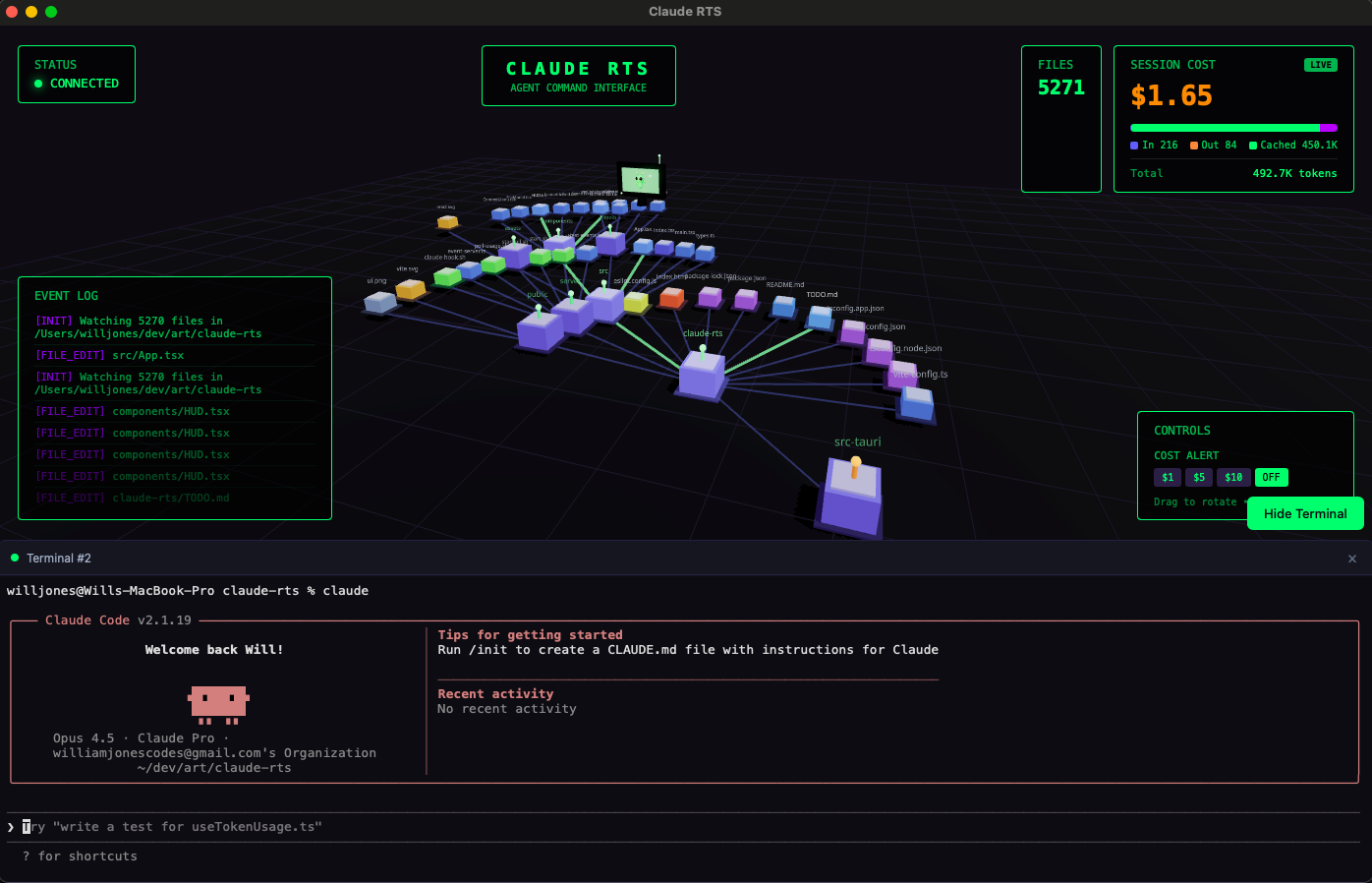
After getting the basic RTS visualizer working, I wanted to take it further. The original version required running three separate terminals: the event server, the Vite dev server, and Claude Code itself. That’s too much friction for daily use. The goal this session was to turn it into a proper desktop app with an embedded terminal - so you could run Claude Code directly inside the visualizer.
Why Tauri Over Electron
The obvious choice for desktop web apps is Electron, but I went with Tauri v2 instead:
| Factor | Electron | Tauri |
|---|---|---|
| Binary size | ~150MB | ~10MB |
| Memory footprint | Higher (ships Chromium) | Lower (uses system WebView) |
| Backend | Node.js | Rust |
| Distribution | Multiple files | Single binary |
The Rust backend was the real selling point. I knew I’d need native system access for the terminal functionality, and Rust gives that without shipping an entire Node.js runtime.
Setting up Tauri was straightforward - it adds a src-tauri/ directory with the Rust backend code and a tauri.conf.json for configuration. One gotcha: the shell plugin config changed between Tauri v1 and v2. The scope field isn’t valid anymore in v2, and the error message wasn’t obvious about what was wrong.
Managing Visual Complexity
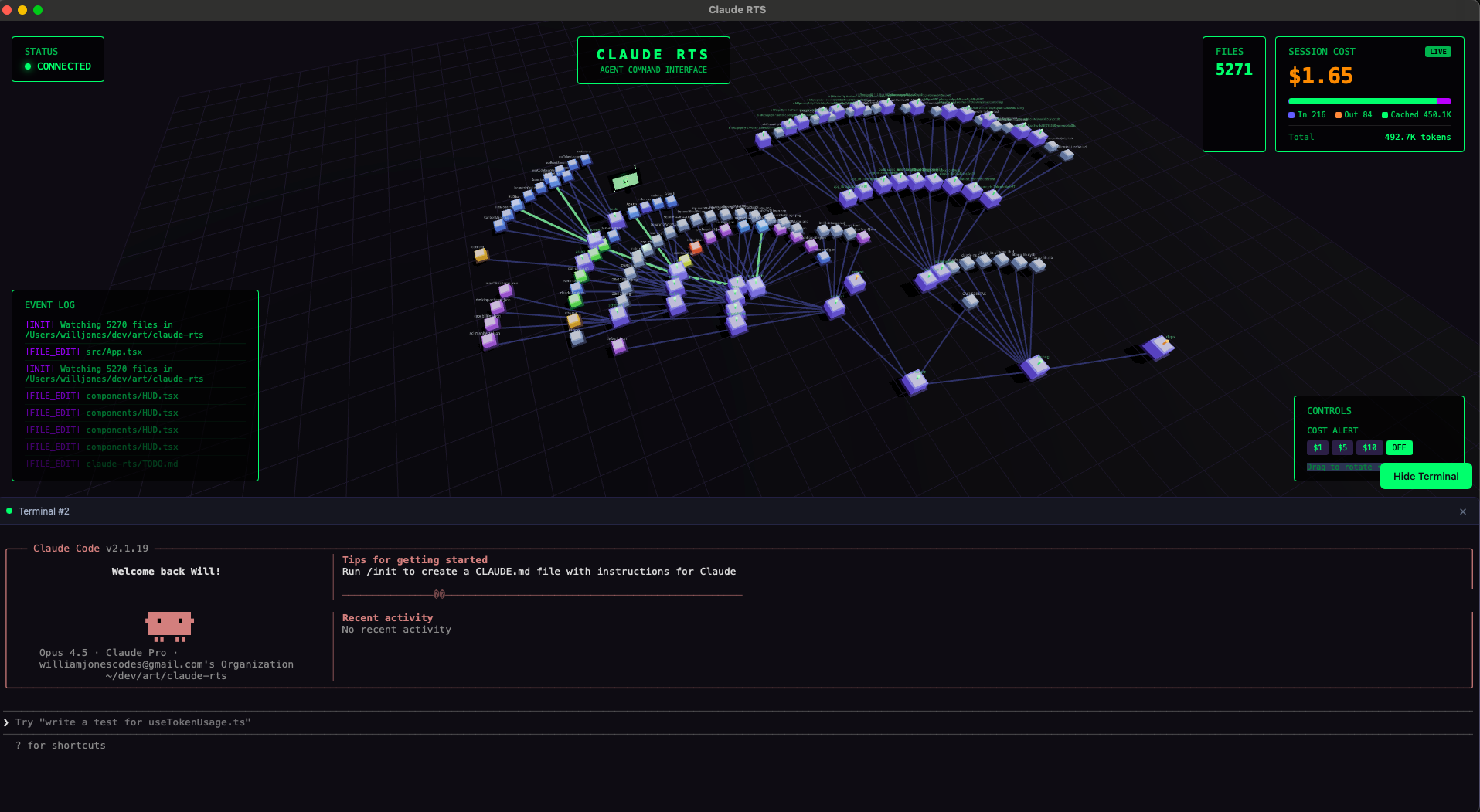
Large codebases were overwhelming the visualization. Opening a project with node_modules meant thousands of buildings flooding the grid, tanking performance and making it impossible to focus on the code that matters.
Right-Click Context Menu
I added a context menu that appears when you right-click on a directory. The menu has a simple toggle: “Hide contents” or “Show contents”. Hidden directories display an orange beacon instead of green, so you can see at a glance what’s collapsed.
// Track which directories are hidden
const [hiddenPaths, setHiddenPaths] = useState<Set<string>>(new Set())

// Filter out children of hidden directories
const visibleCells = gridCells.filter(cell => {
  for (const hidden of hiddenPaths) {
    if (cell.path.startsWith(hidden + '/')) return false
  }
  return true
})
Auto-Hiding Large Directories
Manual hiding works, but it’s tedious to do every time you open a project. So I added automatic hiding for directories with 100+ descendants.
function findLargeDirectories(root: FileNode, threshold = 100): string[] {
  const large: string[] = []

  function countDescendants(node: FileNode): number {
    if (!node.children) return 0
    let count = node.children.length
    for (const child of node.children) {
      count += countDescendants(child)
    }
    if (count >= threshold) large.push(node.path)
    return count
  }

  countDescendants(root)
  return large
}
When the codebase initializes, node_modules and other massive directories start hidden. You can always right-click to reveal them if needed.
Expanding the Hook Configuration
The original hooks only captured write operations:
"matcher": "Write|Edit|MultiEdit"But the visualization should show all activity - reads, searches, everything. Updated it to:
"matcher": "Read|Write|Edit|MultiEdit|Glob|Grep|Bash"Now scouts (read operations) and searchers (grep/glob) spawn units too, giving a complete picture of how Claude navigates the codebase.
The Embedded Terminal
This was the major feature of the session. I wanted to run claude directly inside the app instead of switching to a separate terminal.
Why xterm.js + Rust PTY
The terminal has two parts that need different technologies:
┌─────────────────────────────────────────┐
│  React (xterm.js)                       │
│  - Renders terminal UI                  │
│  - Handles escape codes, colors, cursor │
│  - Captures keyboard input              │
└──────────────┬──────────────────────────┘
               │ Tauri IPC
┌──────────────▼──────────────────────────┐
│  Rust Backend (portable-pty)            │
│  - Spawns /bin/zsh or /bin/bash         │
│  - Manages PTY file descriptors         │
│  - Streams output back to frontend      │
└─────────────────────────────────────────┘
xterm.js for the UI: Terminal rendering happens in the webview, and you can’t run Rust there. xterm.js is the industry standard (VS Code and Hyper use it) and handles all the complex VT100 escape sequences that make Claude Code’s output look right.
Rust for the PTY: Tauri apps don’t have a Node.js runtime, so node-pty isn’t an option. The portable-pty crate gives cross-platform PTY support with native performance.
Rust Implementation
The Rust side manages PTY lifecycle with four commands:
#[tauri::command]
fn terminal_create(rows: u16, cols: u16, cwd: String) -> Result<String, String> {
    // Spawn shell with PTY, return terminal ID
}

#[tauri::command]
fn terminal_write(id: String, data: String) -> Result<(), String> {
    // Send input to PTY
}

#[tauri::command]
fn terminal_resize(id: String, rows: u16, cols: u16) -> Result<(), String> {
    // Handle terminal resize
}

#[tauri::command]
fn terminal_close(id: String) -> Result<(), String> {
    // Clean up PTY
}
Dependencies added to Cargo.toml:
portable-pty = "0.8"
tokio = { version = "1", features = ["sync", "rt"] }
parking_lot = "0.12"
Debugging the Terminal
Getting the terminal working involved solving several timing issues:
1. Tauri detection: The __TAURI__ global doesn’t exist in Tauri v2. The correct check is __TAURI_INTERNALS__.
2. useEffect timing: The terminal creation and PTY connection were racing. The terminal element needs to exist before xterm can attach to it, but the PTY connection was firing before the mount completed.
const [terminalReady, setTerminalReady] = useState(false)

useEffect(() => {
  if (!terminalRef.current) return

  const term = new Terminal({ /* options */ })
  term.open(terminalRef.current)
  setTerminalReady(true)  // Signal that terminal is mounted

  return () => term.dispose()
}, [])

useEffect(() => {
  if (!terminalReady) return
  // Now safe to connect PTY
  connectPty()
}, [terminalReady])
3. onData callback timing: xterm’s onData handler was being set up after the PTY connection, so early keystrokes were dropped. Fixed by setting up onData immediately with a ref that gets populated once the connection is ready:
const writeCallbackRef = useRef<(data: string) => void>()

// Set up immediately
term.onData((data) => {
  writeCallbackRef.current?.(data)
})

// Populate when PTY connects
writeCallbackRef.current = (data) => invoke('terminal_write', { id, data })
4. Keyboard focus: Three.js was capturing keyboard events even when the terminal should have focus. Fixed by stopping propagation on the terminal container and adding explicit focus management.
HUD Repositioning
When the terminal panel opens, it takes up the bottom 40% of the screen. The event log and controls were getting covered, so they needed to slide up.
<div style={{
  position: 'absolute',
  bottom: terminalOpen ? 'calc(40% + 20px)' : 20,
  transition: 'bottom 0.3s ease-out'
}}>
  {/* HUD content */}
</div>
The transition makes it feel smooth rather than jarring.
Performance: Rust vs Node.js
I considered moving the event server from Node.js to Rust. Would it be faster?
Short answer: no meaningful difference for this use case.
| Factor | Reality |
|---|---|
| Workload | I/O bound, not CPU bound |
| Data volume | Tiny JSON payloads (~1KB) |
| Request rate | ~1-10 events/second |
| Bottleneck | React rendering, not server |
The event server is just shuffling small JSON objects between a hook script and WebSocket clients. Node.js handles that fine. The real benefit of moving to Rust would be simplicity - a single binary with no Node.js dependency - not speed.
Current Architecture
Here’s how everything fits together now:
┌─────────────────────────────────────────────────────────┐
│                    Tauri Window                         │
├─────────────────────────────────────────────────────────┤
│  React App                                              │
│  ├── Three.js Scene (3D file visualization)            │
│  ├── HUD (status, tokens, event log, controls)         │
│  ├── Terminal Panel (xterm.js)                         │
│  └── Context Menu (right-click)                        │
├─────────────────────────────────────────────────────────┤
│  Tauri Rust Backend                                     │
│  ├── PTY Management (portable-pty)                     │
│  ├── File System Access                                │
│  └── Claude Stats Reader                               │
├─────────────────────────────────────────────────────────┤
│  External: Node.js Event Server (still needed)         │
│  └── Receives Claude Code hooks → WebSocket broadcast  │
└─────────────────────────────────────────────────────────┘
The event server is still external, but the embedded terminal means you only need two terminals now instead of three.
What’s Next
The TODO list keeps growing:
- Embed event server in Rust - Eliminate the last Node.js dependency
- Minimap - Navigation for large codebases
- Virtualized rendering - Handle 1000+ file projects without lag
- Keyboard shortcuts - Power user controls
- Session replay - Export and playback for demos
The biggest win this session was the embedded terminal. Running claude inside the visualizer and watching units spawn in real-time as it explores - that’s the workflow I wanted. It’s starting to feel like a proper tool rather than a demo.