I’ve been having a blast working with Claude Code. I saw a social media post showing the trend of people creating rts style interfaces to work with Claude Code. I love the idea of visuallizing what you are building and the resources being used. For the last few months I have been using Cursor. I feel a bit behind having not already switched to Claude. Funny how easy it is to get stuck in one’s own ways. Time to shift. Claude code did not disappoint. I was able to spin up a basic demo within 2 prompts. The following is all about the project.
The Concept
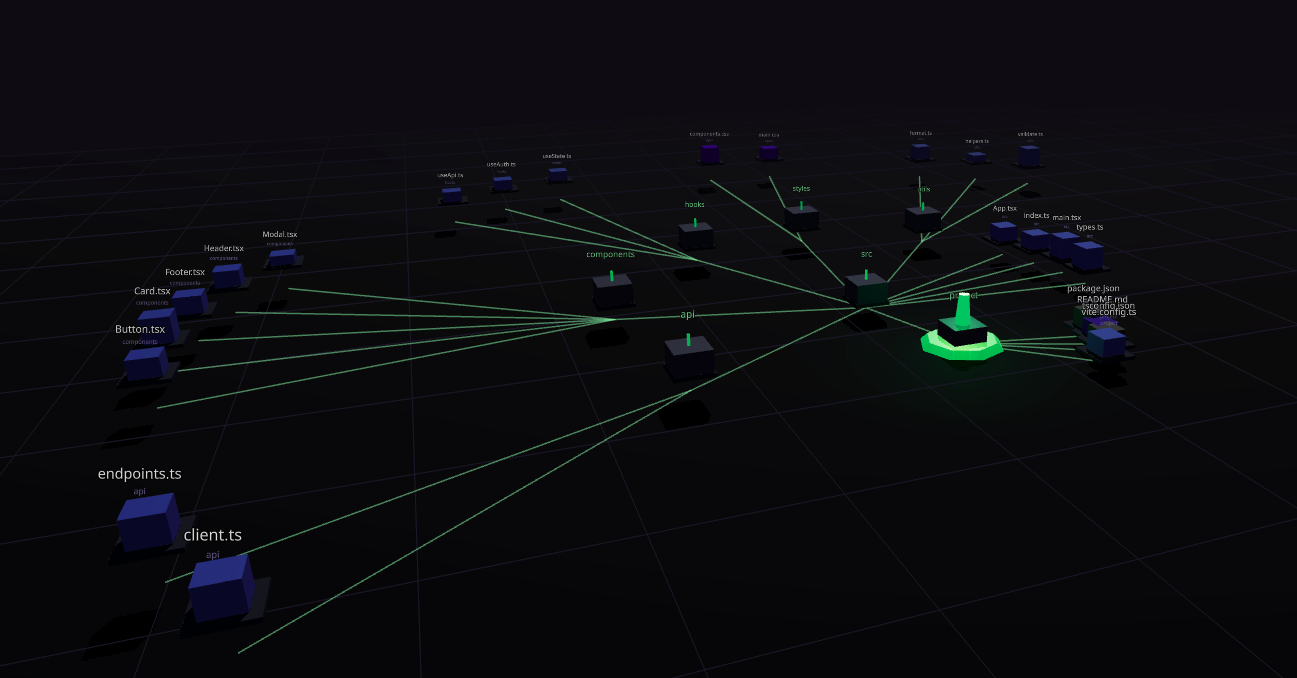
When Claude Code explores a codebase, it performs operations that map surprisingly well to RTS mechanics:
- File reads become scout units exploring territory
- File writes/edits become builder units constructing or modifying structures
- Search operations become searcher units surveying the land
- Directories are buildings, files are structures with heights based on access frequency
The codebase itself becomes the map, with fog of war revealing areas as they’re explored.
Tech Stack
I built this with a modern web stack:
- React 19 + TypeScript for the UI layer
- Three.js via React Three Fiber for 3D graphics
- WebSockets for real-time event streaming from Claude Code
- Vite for fast development iteration
React Three Fiber was the right call here - it lets you build 3D scenes with React’s component model, which made iterating on the visualization much faster than imperative Three.js.
The Architecture
The real magic is connecting Claude Code to the visualizer in real-time. Here’s how the pieces fit together:
┌─────────────────┐     HTTP POST      ┌──────────────────┐     WebSocket     ┌─────────────────┐
│  Claude Code    │ ─────────────────► │  Event Server    │ ────────────────► │  Visualizer     │
│  (hooks)        │    :8766/event     │  (Node.js)       │      :8765        │  (React/Three)  │
└─────────────────┘                    └──────────────────┘                   └─────────────────┘
Claude Code Hooks
Claude Code has a hooks system that lets you run scripts in response to tool use. I configured a PostToolUse hook in ~/.claude/settings.json that fires a shell script after every tool call.
The shell script (claude-hook.sh) parses the tool name and file path, then sends an HTTP POST to the event server:
curl -X POST http://localhost:8766/event \
  -H "Content-Type: application/json" \
  -d "{\"type\":\"$EVENT_TYPE\",\"path\":\"$FILE_PATH\"}"
Event Server
The Node.js server does two things:
- HTTP endpoint (
/event) - Receives events from the hook script - WebSocket server - Broadcasts events to connected visualizers and sends the initial directory structure on connection
When it starts, you point it at a directory to watch. It scans the file tree and sends that structure to the visualizer, which builds the map. Then as Claude Code operates, events flow through and units spawn in real-time.
Event Types
Events map to unit types in the visualizer:
type AgentEventType =
  | 'file_read'
  | 'file_write'
  | 'file_edit'
  | 'directory_list'
  | 'search'
  | 'command_run';
Each event spawns the appropriate unit type and updates the codebase state.
Radial Tree Layout
The codebase is rendered as a radial tree - files and directories are positioned in a circular layout based on hierarchy. Deeper directories appear at higher elevations. The layout algorithm distributes child nodes proportionally based on their descendant count, so larger subtrees get more visual space.
Unit System
Four unit types, each with distinct appearance and behavior:
| Unit | Event | Color | Shape |
|---|---|---|---|
| Scout | file_read, directory_list | Green | Cone |
| Builder | file_write, file_edit | Orange | Box |
| Searcher | search | Purple | Sphere |
| Debugger | (future) | Red | Octahedron |
Units spawn at a central base station, travel to their target file, “work” for a bit with an animation, then disappear. This creates a constant flow of activity across the map as Claude Code operates.
Visual Polish
The aesthetic leans sci-fi/cyberpunk:
- Dark background with neon accents
- Point lights on units for glow effects
- Fog adding atmospheric depth
- Buildings color-coded by file type (TypeScript = blue, JS = yellow, etc.)
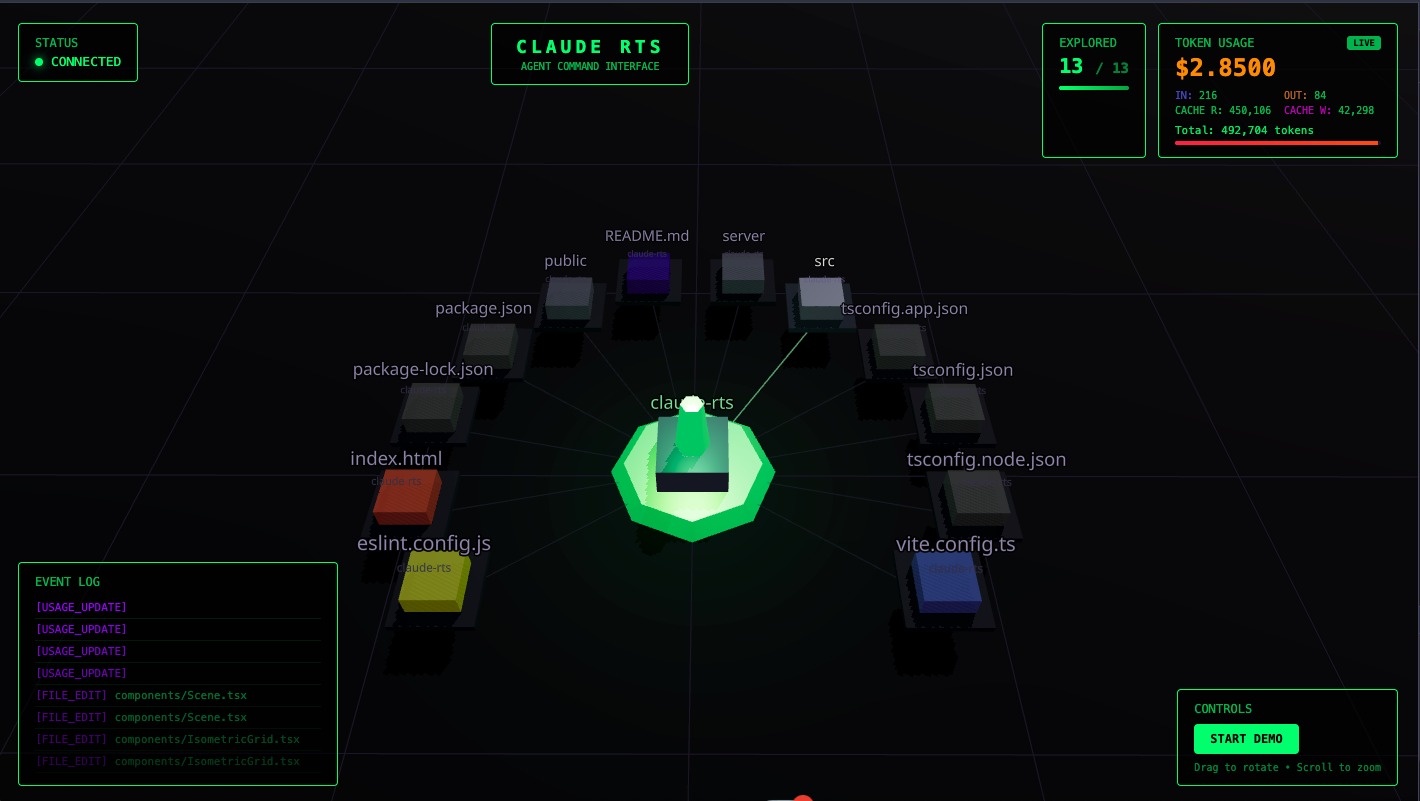
- Monospace HUD with event log and exploration progress
Working with Claude Code
Building this project was a great exercise in pairing with an AI coding assistant. Claude Code was particularly helpful for:
- Three.js specifics - quaternion math, shader setup, the React Three Fiber patterns
- State management - designing the hooks for codebase state, unit lifecycle, event streaming
- Iterating quickly - describing what I wanted to see and getting working implementations to try
The feedback loop of “describe, implement, visualize, refine” worked well for this kind of creative project.
Demo Mode
Since not everyone has Claude Code running, I added a demo mode that generates simulated events. This lets you see the visualization in action without a backend connection - units spawn randomly and explore a sample file tree.
What’s Next
Some ideas for extending this:
- Token usage visualization as a resource counter
- More detailed file metadata on hover
- Recording and playback of sessions
- Multiple agent visualization for parallel operations
Running It
To see it in action, you need three terminals:
# Terminal 1: Start the event server watching a directory
npx tsx server/event-server.ts /path/to/your/project

# Terminal 2: Start the visualizer
npm run dev

# Terminal 3: Start a fresh Claude Code session (hooks load on start)
claude "do something"
Open http://localhost:5173 and watch the units move as Claude explores your codebase.
For testing without burning tokens, there’s a demo mode that simulates events - just toggle it in the UI.
Building this was a reminder that visualizations can make abstract processes tangible. Watching units travel across a 3D codebase is more engaging than reading a log file - and it might even help with understanding how AI agents navigate code.
A Settings Gotcha
While setting up the hooks, I ran into a configuration error. The matcher format had changed, and I was using an object where a string was expected:
matcher: Expected string, but received object
The fix was straightforward - the matcher can be a simple regex string to match tool names:
{
  "hooks": {
    "PostToolUse": [
      {
        "matcher": "Write|Edit|MultiEdit",
        "hooks": [
          {
            "type": "command",
            "command": "/path/to/claude-hook.sh"
          }
        ]
      }
    ]
  }
}
The pipe-separated pattern matches any of those tools. One thing to note: files with settings errors are skipped entirely by Claude Code, so you won’t get partial functionality - it’s all or nothing until you fix the config.
Dynamic Directory Switching
Another issue I ran into: the event server sets its base path once at startup and scans that directory for the initial file structure. This works fine if you only use Claude Code in that one directory. But if you open Claude in a different project, the hook script sends events with paths from the new directory while the visualizer is still showing the old file structure.
The fix was to make the server detect when events arrive from outside the current base path and automatically switch:
- Find the project root - Walk up from the file path looking for markers like
.git,package.json,Cargo.toml, etc. - Check if path is external - Compare incoming event paths against the current base path
- Switch and broadcast - When a new project is detected, re-scan the directory and push an updated
initevent to all connected clients
// Check if the event path is from a different directory
if (event.path && event.path.startsWith('/') && !isUnderBasePath(event.path)) {
  const newRoot = findProjectRoot(event.path)
  if (newRoot && newRoot !== basePath) {
    switchToDirectory(newRoot)
  }
}
Now when you switch to a new Claude Code session in a different directory, the first tool event triggers a re-scan and the visualizer updates to show the new codebase. No need to restart the server.
Adding Real Token Usage
The original HUD showed token usage, but it was just estimation - guessing how many tokens each operation might use. I wanted real data from Claude Code itself.
The first step was figuring out how Claude Code exposes usage data. I started by checking if there was a /usage command, but that’s not directly scriptable. Then I discovered the --output-format=json flag:
echo "What is 2+2?" | claude -p --output-format=jsonThis returns structured JSON with actual token counts:
{
  "usage": {
    "input_tokens": 1234,
    "output_tokens": 567,
    "cache_read_input_tokens": 890,
    "cache_creation_input_tokens": 123
  },
  "total_cost_usd": 0.0234
}
The data includes input tokens, output tokens, and cache usage (both reads and writes). Claude Code’s prompt caching means a lot of context gets reused across turns, so tracking cache hits is useful for understanding actual costs.
With the data format figured out, I updated the system in layers:
1. Extended the types to include real usage data alongside the legacy estimated fields:
export interface AgentEvent {
  // ... existing fields
  usage?: {
    inputTokens: number
    outputTokens: number
    cacheReadInputTokens: number
    cacheCreationInputTokens: number
    totalCostUSD: number
  }
}
2. Rewrote the token usage hook to handle real data when available, falling back to estimates otherwise. A key addition was an isRealData flag so the UI can distinguish between actual and estimated values.
3. Added usage endpoints to the event server - both GET /usage to fetch current stats and POST /usage to receive updates from external sources.
4. Updated the HUD to show a detailed breakdown:
- Cost in USD (the number you actually care about)
- Input vs output tokens
- Cache read vs cache write tokens
- A “LIVE” badge when showing real data
The result is a resource panel that feels more like an RTS - you can see your “minerals” (tokens) being consumed in real-time, with a breakdown of where they’re going. The cache metrics are particularly interesting: high cache read numbers mean Claude is efficiently reusing context, which keeps costs down.
One thing I learned: Claude Code stores session data in ~/.claude/sessions/. Each session gets a JSON file with cumulative usage stats. A simple polling script can read these files and push updates to the event server, giving you live cost tracking without modifying the hook script.
Building claude plugins could be a new hobby. This was a lot of fun.